Simplifying Data Transformation with IBM App Connect Mapping Node
In this blog, we will learn how to simplify data transformation with the IBM App Connect mapping Node.
In integration projects, incoming data often doesn’t match the format your applications require—XML may arrive when JSON is expected, or API responses might miss essential details from databases. Such mismatches can cause delays, errors, and inconsistencies.
The IBM App Connect Mapping Node simplifies this by enabling effortless data transformation and enrichment, ensuring smooth, reliable information flow across systems without requiring extensive coding.
Mapping Node Overview
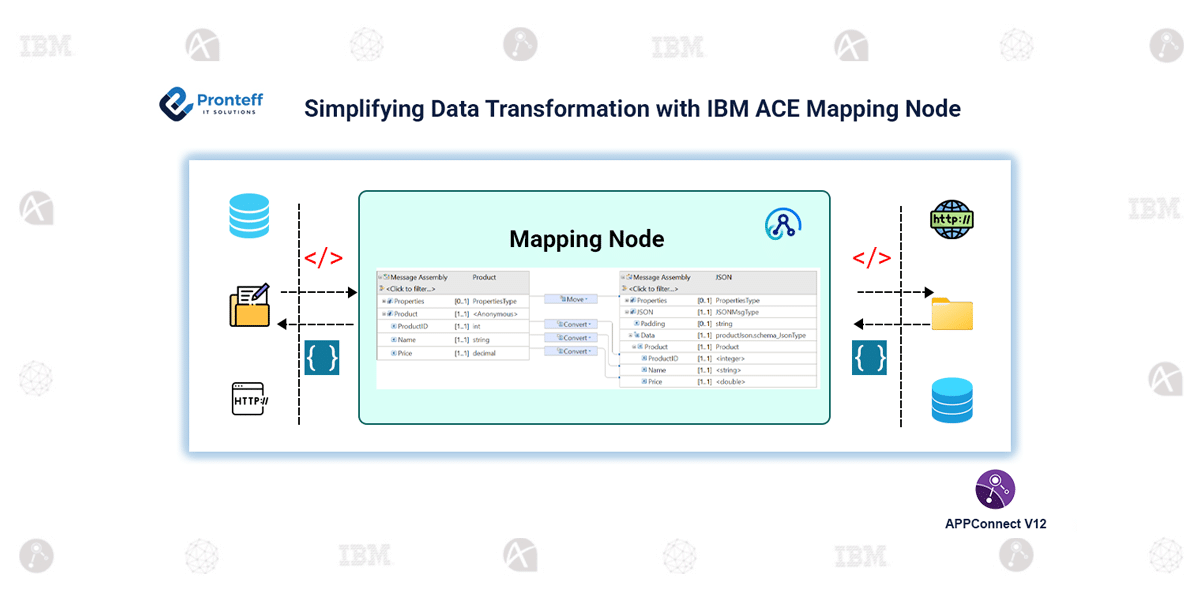
The Mapping Node in IBM App Connect Enterprise (ACE) is a graphical tool that allows developers to transform messages without writing complex code. It provides a visual interface to:
- Select fields from the input message.
- Map them to the desired output.
- Apply transformations or rules before sending data forward
This approach simplifies integration flows, reduces errors, and enhances team collaboration.
Key Use Cases
- Format Transformation
Convert messages between XML, JSON, or CSV to ensure smooth system communication without complex coding. - Global Cache Interaction
Access embedded or external global caches to store, fetch, or remove key-value pairs. This enables fast, dynamic data enrichment and reduces repeated database lookups. Cache errors can be handled seamlessly, keeping flows robust. - Database Interaction
Perform operations like querying, inserting, updating, or deleting records using database transforms. This allows messages to interact with databases declaratively, without writing direct SQL.
Core Capabilities
- Visual Mapping: Drag-and-drop interface for mapping inputs to outputs
- Complex Transformations & Format Conversion: Apply logic, loops, and functions while converting between formats
- Dynamic Mapping: Select message maps at runtime for flexible flows
- Database Interaction: Query, insert, update, or delete records within mappings.
- Global Cache Access: Read/write shared cache data for fast lookups.
- Access Message Components: Work with body, headers, and local environment data
- Reusability: Reuse mapping logic across flows and projects.
CSV to JSON Transformation Example in IBM ACE v13
Consider designing a CSV-to-JSON Transformation Flow in IBM App Connect Enterprise (ACE) v13.
- Set Up Schemas: Define CSV (DFDL) input and JSON output schemas, enable headers, and map fields like ID, Name, Email, and Country.
- Build the Flow: Connect HTTP Input → Mapping → HTTP Reply, configure POST requests, and validate input against the CSV schema.
- Design the Mapping: Drag and drop fields in the Mapping node, switching actions from Move to Convert when needed to ensure proper formatting.
- Deploy & Test: Send a CSV payload through the endpoint. A structured JSON response confirms success, while invalid inputs trigger validation errors.
This streamlined approach ensures data accuracy, real-time validation, and simplified integration, making the Mapping Node a powerful tool for enterprises.