Load balancing across backend servers with Apigee
In this blog, we will learn how Apigee load balance traffic across backend servers.
When you deploy APIs with Apigee, you often need to ensure high availability and scalability across multiple backend services. Apigee simplifies this by offering built-in support for load balancing and failover across multiple backend server instances.
Target Servers
Rather than embedding concrete endpoint URLs straight into your API proxy configuration, Apigee introduces the notion of named Target Servers. A Target Server defines a backend host and port under a unique name, decoupling backend infrastructure from the proxy’s logic.
name, Host, and Port are mandatory; IsEnabled lets you include or exclude a server from rotation without changing your proxy.
Using multiple Target Servers for load balancing
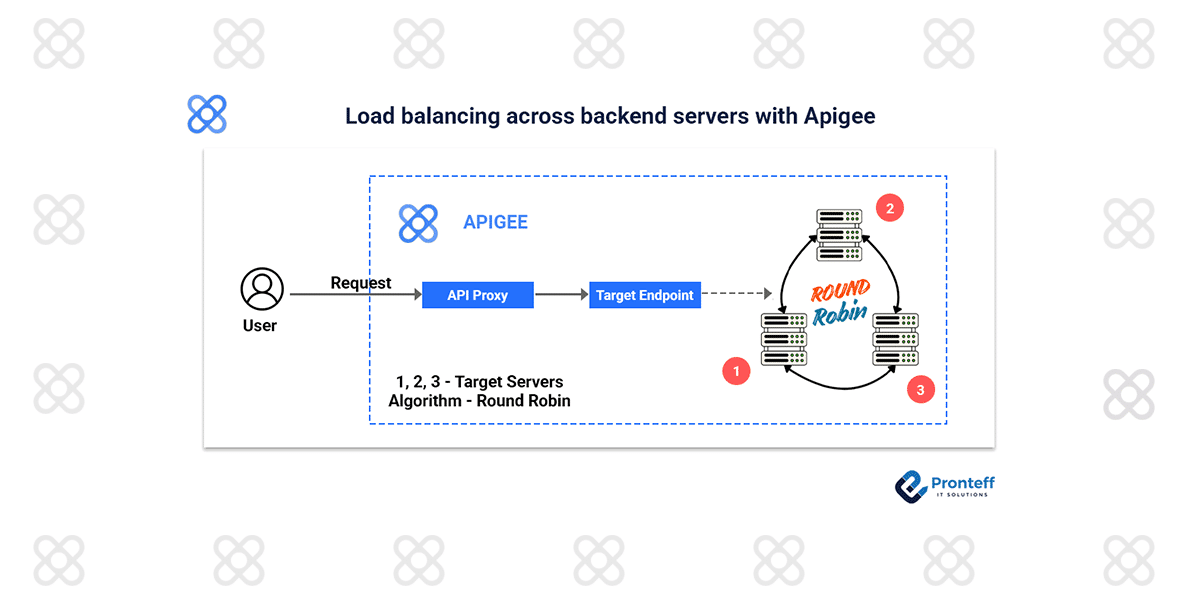
Once you define two or more Target Servers, you can configure your API proxy’s target endpoint to use them in load-balancing mode.
By default, Apigee uses the Round-Robin algorithm, alternating requests evenly between the configured Target Servers.
You can also choose other strategies:
- Weighted — where servers receive traffic in proportion to assigned weights (e.g. if target2 has a weight of 2 and target1 weight of 1, target2 gets twice as many requests).
- Least Connections — send each new request to whichever server currently handles the fewest open connections.
Enhancing reliability: Failover & health-checks
Load balancing alone isn’t enough; Apigee supports health monitoring and failover to improve resilience.
- Retries: If a request fails due to an I/O error or timeout (not HTTP status codes), Apigee can retry automatically — but only when you’ve defined at least two Target Servers for redundancy.
- Fallback server: You can designate one Target Server as a “fallback”. It stays out of normal rotation until all other servers become unavailable — then receives all traffic.
- HealthMonitor + MaxFailures: By configuring a <HealthMonitor>, Apigee periodically probes each Target Server. If a server fails consecutively beyond a threshold (<MaxFailures>), it’s taken out of rotation and added back only after it passes health checks.
This makes the API robust against backend downtime and removes manual effort in re-enabling recovered servers.