REDIS Request in IBM App Connect Enterprise V13.0.5.0
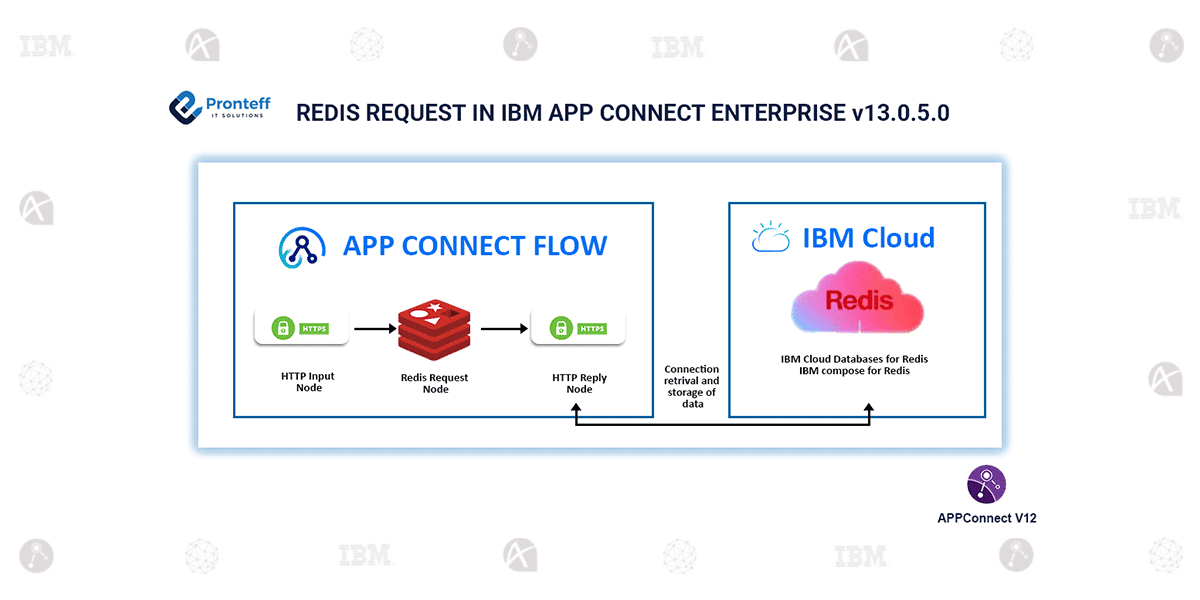
In this blog, we will learn about Redis Request in IBM App Connect Enterprise v13.0.5.0.
Previously, to connect to the Redis cache, we had to use Java Compute and external Java libraries to connect to the redis cache. Since the embedded global cache has been revamped ( the underlying technology ), there has been the possibility of connecting to an external cache like Redis using the Java compute node.
Although it has been available, using the Java compute node, that too with external libraries might cause some latency in sending requests and receiving the responses from the Redis cache. In app connect v13.0.5.0, the Redis request node has been introduced to fetch and store data from the IBM Cloud Databases for Redis and IBM Compose for Redis with minimal configuration and code.
Redis Cache:
Redis (Remote Dictionary Server) is an in-memory caching system that stores data in RAM, making it extremely fast—typically sub-millisecond access times.
It supports data types like strings, lists, sets, hashes, sorted sets, streams, etc.
Features of Redis:
- Blazing fast performance due to in-memory storage.
- More powerful data structures than Memcached or simple caches.
- Supports persistence, making it more than just a cache.
- Versatile — can act as a cache, message queue, session store, or DB.
- Easy to scale using clustering and replication.
- Provides high availability with Sentinel.
- Atomic operations, ensuring consistency.
- Simple commands and developer-friendly.
- Wide language and framework support.
Redis Request Node:
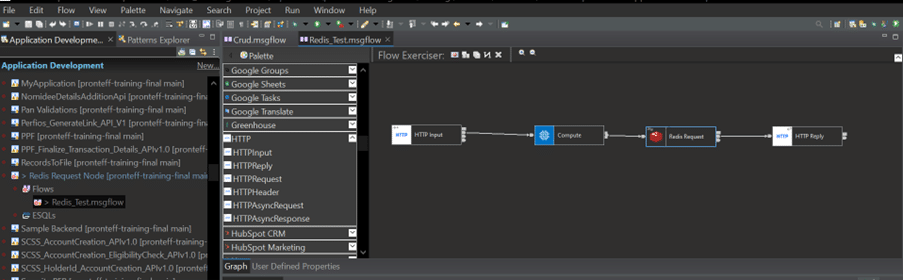
IBM App Connect Enterprise communicates synchronously with Redis through the Redis Request node. App Connect currently supports only the IBM cloud versions of Redis from v6 to v7.
You can use the Redis Request node to connect to a Redis instance and execute operations on the supported Redis data types listed below:
- Hashes: Create/update hash, check field presence, get field count, get field value.
- Keys: Delete key, check presence, get type, get TTL, remove expiry, rename, set expire-at, set expiry timeout.
- Lists: Update list, create/update list, get length, trim list.
- Sets: Create/update set, check member presence, get member count.
- Sorted Sets: Create/update sorted set, get member count, count by score range, get rank, get score.
- Strings: Create/update string, append value, get value.
Configuring the Redis Request node:
- Create a Redis connection policy and store it within a policy project. Use the appropriate credential storage mechanism to securely configure the Redis IP address and port.
- Configure this policy in the Redis Request node and launch the Discovery Connector from the Basic Properties panel.
- Apply the attached policy in the flow and set the required action (e.g., create or update strings, hashes, etc.).
- Define the data and schema on the Discovery Connector to structure the request sent to the Redis cache.
Flow Screenshot: