Monitoring AWS RDS Performance with DBmarlin
In this blog, we explore how DBmarlin enables effective monitoring of AWS RDS by providing deep visibility into SQL activity, wait states, and CloudWatch performance trends.
Introduction: The Visibility Trade-off in Managed Databases
Using Amazon RDS removes the burden of infrastructure management—no OS access, automated backups, and built-in high availability. But that abstraction comes at a cost: you lose direct visibility into the host layer.
When performance issues occur, you’re forced to relate database behaviour with limited infrastructure signals. Most traditional tools depend on OS-level access, which simply doesn’t exist in RDS environments.
How DBmarlin Bridges the Gap
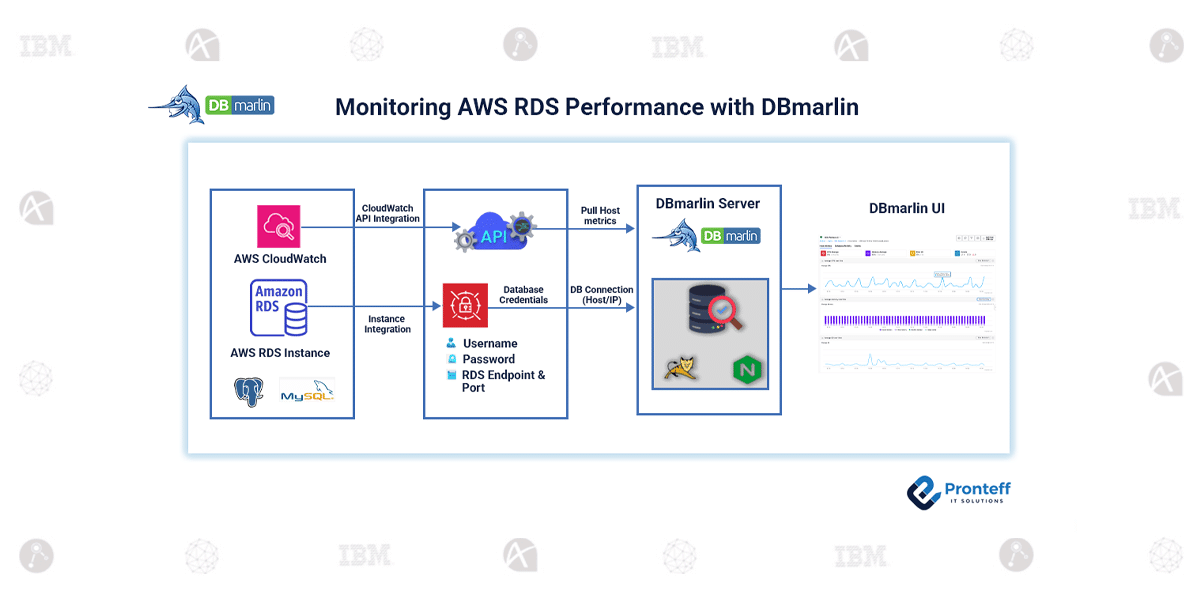
DBmarlin solves this by combining two data sources:
- Database layer: Direct connection to RDS to capture SQL activity, wait events, and sessions
- Infrastructure layer: Metrics pulled from Amazon CloudWatch, such as CPU, disk, and memory
Because RDS restricts host access, CloudWatch becomes the authoritative source of infrastructure data. This integration relies on secure API access (IAM roles with read-only permissions) and HTTPS connectivity, keeping the setup lightweight and aligned with AWS security practices.
From Raw Metrics to Usable Signals
CloudWatch provides raw metrics like CPUUtilization, but DBmarlin standardizes them into consistent, comparable terms such as Average CPU or Disk Throughput.
This makes it easier to analyze performance across:
- RDS and on-prem systems
- Different cloud or hybrid setups
More importantly, it allows you to correlate SQL activity with resource behavior—for example, identifying whether a CPU spike is tied to a specific query or broader system pressure.
Conclusion
RDS removes infrastructure complexity, but not the need to understand it. By combining database-level insights with CloudWatch-driven metrics, DBmarlin fills the visibility gap and enables precise troubleshooting—so performance issues can be traced to their actual root cause rather than being guessed. This helps database teams improve stability, optimize workloads, and maintain consistent application performance in cloud environments.