Key Features of IBM App Connect Enterprise 13.0
In this blog, we will learn about the key features of IBM App Connect Enterprise 13.0.
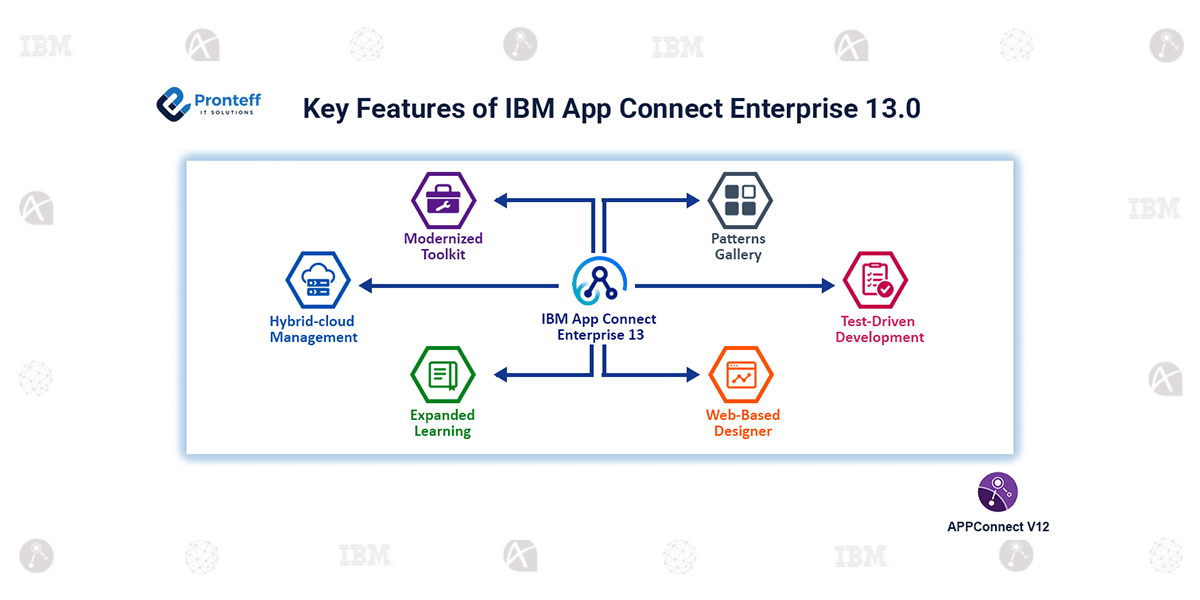
IBM App Connect Enterprise (ACE) 13.0 introduces several improvements that make integration development faster, easier, and more efficient. The new version focuses on enhancing developer productivity, expanding connectivity options, and providing better operational visibility across hybrid environments. These enhancements are largely driven by feedback from customers and aim to simplify the process of building and managing integrations.
-
Modernized Toolkit Interface
ACE 13.0 includes an updated Toolkit with a cleaner and more intuitive interface. The improved design makes it easier for developers to build message flows and manage message models. With simplified navigation and a more user-friendly layout, developers can design integration solutions more quickly.
-
Expanded Learning Resources
The platform now provides a large collection of built-in tutorials that help users understand the product faster. These tutorials cover essential tasks such as creating integration servers, designing message flows, and performing testing. As a result, new users can become productive in a shorter time.
-
Patterns Gallery for Faster Development
The new Patterns Gallery streamlines project development by providing reusable integration templates that help developers get started more efficiently. It offers ready-made templates that can be used as a starting point when building integration solutions. By using these patterns, developers can reduce development effort and focus on business logic.
-
Smart Connectors for Easy Integration
ACE 13.0 includes more than 100 smart connectors that enable seamless integration with various systems. These connectors allow organizations to connect cloud applications, SaaS platforms, databases, APIs, and messaging services with minimal configuration.
-
Support for Test-Driven Development
The new version supports test-driven development practices. Developers can create and execute JUnit tests for message flows, allowing them to validate functionality early in the development cycle and improve code reliability.
-
Web-Based Integration Designer
ACE Designer is a browser-based graphical tool that allows users to create and test integrations without extensive coding. This feature enables even non-technical users to build integrations through a visual interface.
-
Improved Hybrid-Cloud Management
ACE 13.0 also enhances monitoring and operational dashboards, providing better visibility across multiple environments. This allows organizations to efficiently manage integrations deployed on both cloud and on-premises infrastructure.