

By Shubham Tiwari. Updated 29 October 2026.
IBM App Connect Dashboard S3 Storage on Kubernetes and OpenShift
A practical view of BAR-file storage, deployment architecture, and the production decisions that make object storage work for integration teams.
A running integration does not guarantee that the next deployment will succeed. If the artifact repository is unavailable, a healthy Dashboard and runtime environment can still leave a release waiting.
IBM App Connect Dashboard uses a content server to manage uploaded or imported BAR files. That content can be backed by persistent volumes, ephemeral storage, or, on supported versions, S3 object storage. Choosing the right option means aligning artifact retention with your platform, security, and recovery requirements.
Decide where deployment artifacts will live, who can access them, and how they will be recovered before creating the Dashboard.
Where S3 fits in the architecture
BAR files contain packaged integration resources used for deployment. With S3 storage selected, the Dashboard’s content server reads and writes BAR files and associated token objects in the configured bucket. Teams select the required BAR file through the Dashboard to deploy an integration runtime.
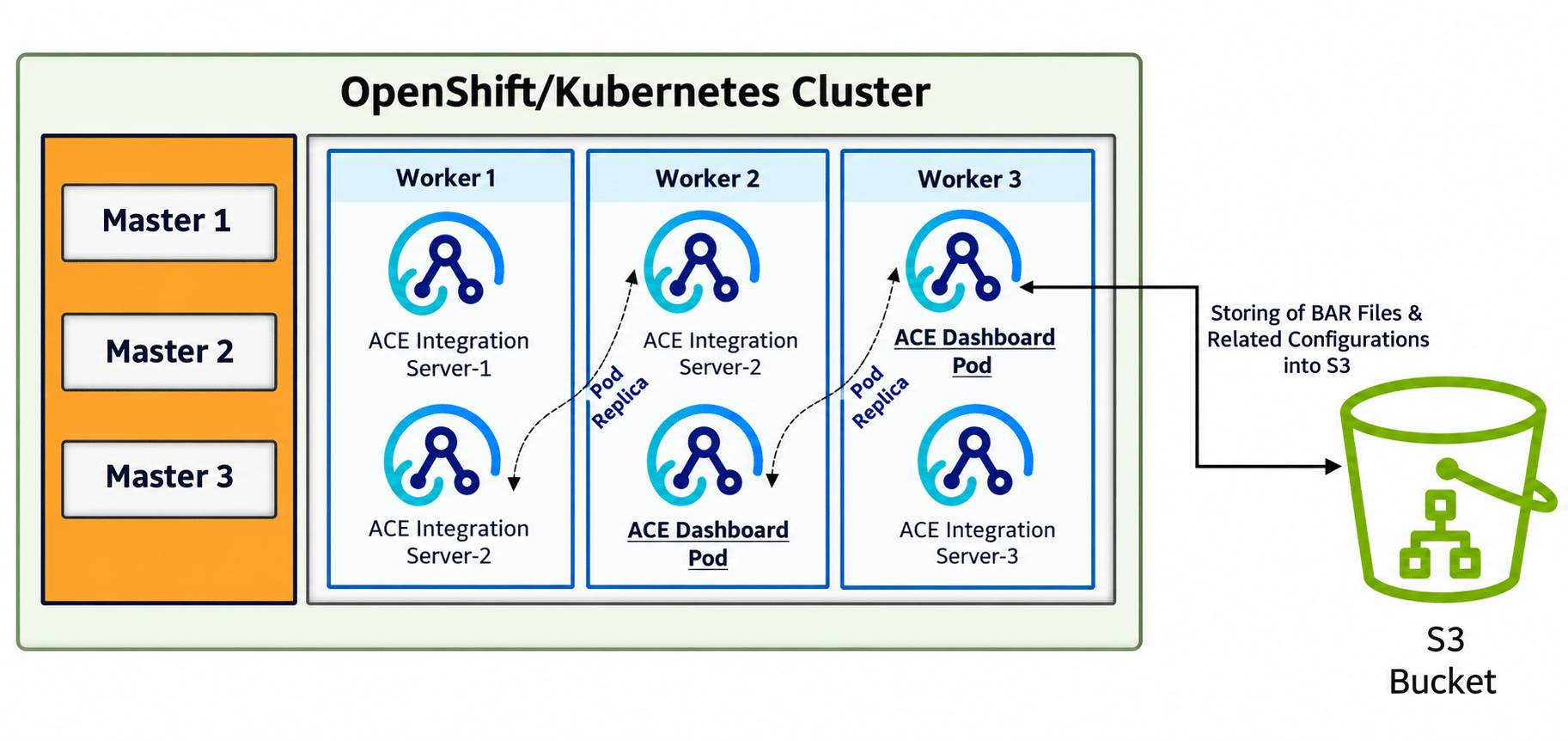
Platform users
App Connect Dashboard
Integration runtimes
External S3 bucket
S3 allows artifact-storage capacity to be managed independently of cluster-attached file storage. It also makes endpoint connectivity, credentials, and object-store availability part of the deployment path. Monitor that path separately from the health of running integrations.
This storage setting covers Dashboard-managed artifacts. Runtime business data, message payloads, and application configuration still need their own storage design.
Choosing the storage approach
| Approach | Best fit | Main consideration |
|---|---|---|
| Persistent volume | Retaining artifacts with cluster-managed file storage. | IBM documents a file-based ReadWriteMany (RWX) requirement. Plan capacity and storage-provider resilience. |
| Ephemeral storage | Temporary environments where artifact loss is acceptable. | Content is tied to the pod lifecycle; do not rely on it surviving pod replacement. |
| S3 object storage | Holding Dashboard-managed artifacts in an external storage service. | Validate provider support, access permissions, endpoint reachability, and recovery. |
| External repository or runtime image | Release pipelines that already manage BAR files outside the content server. | This is a different artifact-delivery pattern. Govern access, provenance, and promotion through the pipeline. |
The choice should follow how your teams release and support integrations. An organization with a mature artifact repository may need a different approach from a team that uploads BAR files directly through the Dashboard.
A concise implementation approach
Start with the deployed Dashboard and Operator versions, the existing artifact workflow, and recovery objectives. Confirm the supported storage provider before provisioning the bucket or configuring access.
- Prepare the storage boundary. Assign the bucket, endpoint, and environment ownership. Establish network access and credentials scoped to the required operations.
- Configure the Dashboard. Create the appropriate
S3Credentialsconfiguration and reference it alongside the bucket and endpoint when selecting S3 storage. - Validate the complete path. Test upload, import, listing, retrieval, and deployment with representative BAR files. Include credential failures, endpoint outages, and recovery checks.
Choose storage during Dashboard creation. IBM documents that the storage type cannot simply be changed on an existing instance; moving an established environment to S3 calls for a planned migration, artifact validation and cutover.
Production considerations
- Environment isolation: Dashboards using the same bucket, endpoint, and credentials can see the same BAR files. Use separate storage boundaries unless sharing is intentional.
- Security ownership: restrict credential access, establish rotation, and configure encryption and access logging through the chosen provider’s controls.
- Connectivity and latency: place the bucket close to the Dashboard where practical and measure artifact operations. IBM’s 12.0.x guidance excludes S3 storage in restricted-network Operator installations.
- Recovery and retention: define how artifacts and access will be restored. Check that retention or deletion rules do not remove content still needed for deployment or rollback.
- Operational monitoring: track failed artifact operations and storage-service health. Assign owners for bucket policy changes, credential issues and recovery exercises.
Frequently asked questions
Which versions and S3 providers are supported?
IBM documentation for 12.0.x supports S3-backed Dashboard storage from version 12.0.1.0-r1 and lists Amazon S3 and IBM Cloud Object Storage S3. Check the exact Dashboard and Operator release before implementation; later releases can have different provider support.
Can an existing Dashboard switch directly to S3?
No. Treat this as a migration to a newly configured Dashboard, with an inventory of artifacts, validated transfers, and a controlled cutover.
Does the bucket store running integration data?
This feature stores BAR artifacts managed by the Dashboard content server and their associated token objects. It is not a general-purpose store for the integration’s business data.
The takeaway
S3-backed Dashboard storage is useful when teams want to manage BAR artifacts independently of cluster-attached volumes. A successful design connects that choice to product support, environment isolation, secure access, and a recovery process that has been tested.
For an implementation engagement, the starting point is a focused architecture assessment: confirm the release workflow, select the storage model, and validate the full artifact-to-deployment path before production rollout.