SAS Viya Running on Red Hat OpenShift Service for AWS
In this blog, we will learn whether SAS Viya is running on Red Hat OpenShift Service for AWS.
Through collaboration between SAS and Red Hat, a unified and flexible deployment approach has been established. SAS Viya can now run on a wide range of x86_64 environments that support OpenShift. These include both managed and self-managed setups across on-premises and cloud platforms such as bare metal, VMware, Azure, AWS, and ROSA.
For detailed specifications and updates, refer to the official SAS documentation and system requirement guides. Compatibility between SAS Viya and OpenShift versions should always be verified. For example, SAS Viya 2026.01 supports OpenShift versions 4.18 through 4.20, aligning closely with OpenShift release cycles.
Understanding ROSA
Red Hat OpenShift Service on AWS (ROSA) is a fully managed Kubernetes platform designed to simplify application deployment and operations within AWS. It enables organizations to focus on innovation while reducing infrastructure management overhead.
By running SAS Viya on ROSA, users benefit from:
- A managed cloud-native platform jointly operated by Red Hat and AWS
- Faster deployment and scalability
- Reduced operational complexity
ROSA is available directly through the AWS console with flexible, usage-based pricing models. It supports both hourly and annual billing, along with discounted reserved pricing options.
There are two deployment models:
- ROSA Classic
- ROSA with Hosted Control Planes (HCP)
The HCP model improves efficiency by hosting the control plane in a Red Hat-managed AWS account, reducing costs and accelerating cluster provisioning.
Overview of the SAS Viya Platform
SAS Viya is a cloud-native platform designed for AI, analytics, and data management. Rather than being a single tool, it is a collection of integrated services that support the full analytics lifecycle.
Key characteristics include:
- Fully containerized architecture
- Kubernetes-based deployment
- CI/CD-enabled operations
- Collaboration across roles—from data scientists to business leaders
Technically, SAS Viya is deployed within a single Kubernetes namespace and can run either on dedicated infrastructure or shared clusters. Deployment can be performed manually or automated using SAS-provided operators.
Reference Architecture: SAS Viya on ROSA
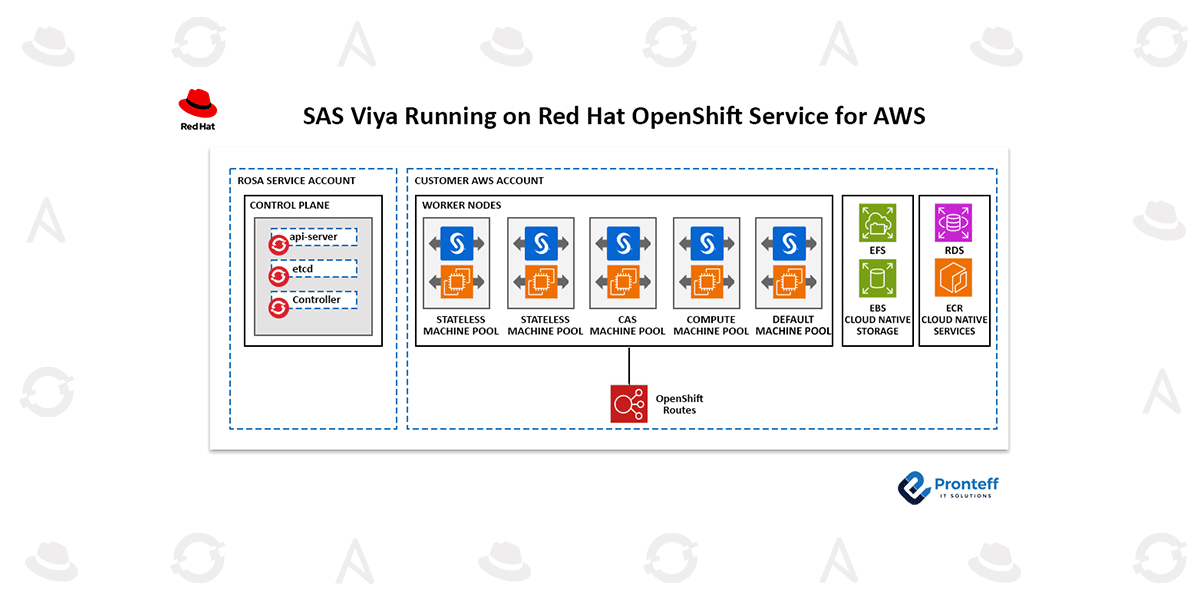
To maximize scalability and performance, SAS Viya workloads are divided into categories and assigned to specific node groups (machine pools). This ensures optimal resource allocation for each workload type.
Recommended Workload Segmentation:
- CAS (Cloud Analytics Services) – High-performance analytics
- Compute Services – Data processing workloads
- Stateless Services – Microservices and web applications
- Stateful Services – Core infrastructure components
- Default Pool – General-purpose workloads
Using machine pools with node labels and taints helps enforce proper workload placement and improves performance and resource utilization.
Supporting AWS Services
Several AWS-native services are typically integrated:
Database
Amazon RDS for PostgreSQL is commonly used to store SAS metadata. As a managed service, it simplifies tasks such as scaling, backups, and high availability.
Container Registry
Amazon ECR is often used to host SAS container images before deployment. Many organizations prefer using a local registry for:
- Security scanning
- Reduced latency
- Version control across environments
Storage
- Amazon EBS for block storage (RWO)
- Amazon EFS for shared storage (RWX)
These services meet the storage needs of SAS workloads, including high-performance requirements for caching and temporary data.
Deployment Workflow
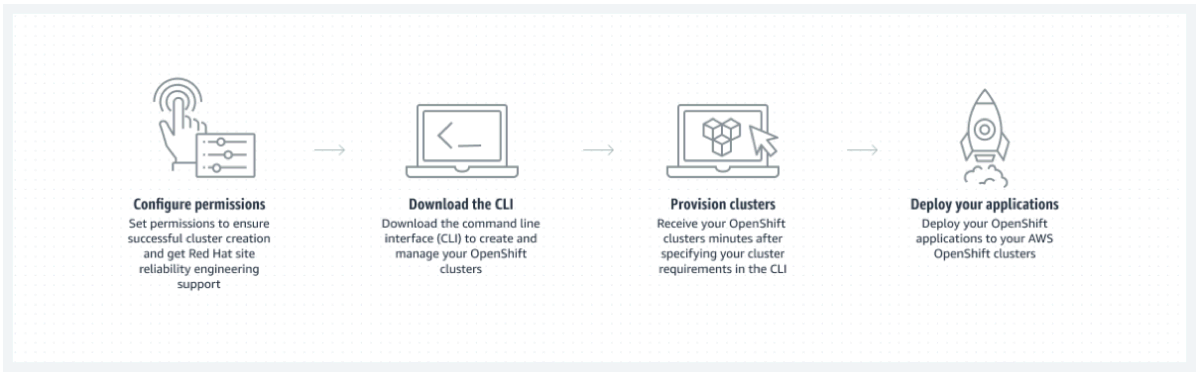
The deployment process involves setting up both ROSA and SAS Viya.
ROSA Setup
Prerequisites:
- Link AWS and Red Hat accounts
- Install AWS CLI and ROSA CLI
- Configure networking (VPC)
- Create IAM roles and OIDC configuration
Cluster Deployment:
- Use ROSA CLI or web console
- Select ROSA with HCP for optimized performance
Post-Deployment Tasks:
- Create additional machine pools
- Enable EFS CSI driver
- Configure RDS and ECR
- Apply required security policies and operators
SAS Viya Deployment
After obtaining a license, SAS provides deployment templates (YAML files) that must be customized.
Key Steps:
- (Optional) Mirror container images to ECR
- Download deployment assets
- Prepare a build environment
- Create a new OpenShift project
- Customize deployment using `kustomize.`
Important Configurations:
- TLS certificates
- Storage classes (EBS/EFS)
- PostgreSQL database (recommended: external via RDS)
- Authentication (e.g., LDAP)
- Security settings (fsGroup, SCCs)
Once configured, the final deployment manifest (`site.yaml`) is applied to the cluster using Kubernetes commands.
Conclusion
Deploying SAS Viya on ROSA provides a scalable, cloud-native analytics platform backed by managed services from AWS and Red Hat. By combining Kubernetes orchestration with flexible infrastructure and automation tools, organizations can streamline analytics operations while maintaining performance, security, and scalability.