

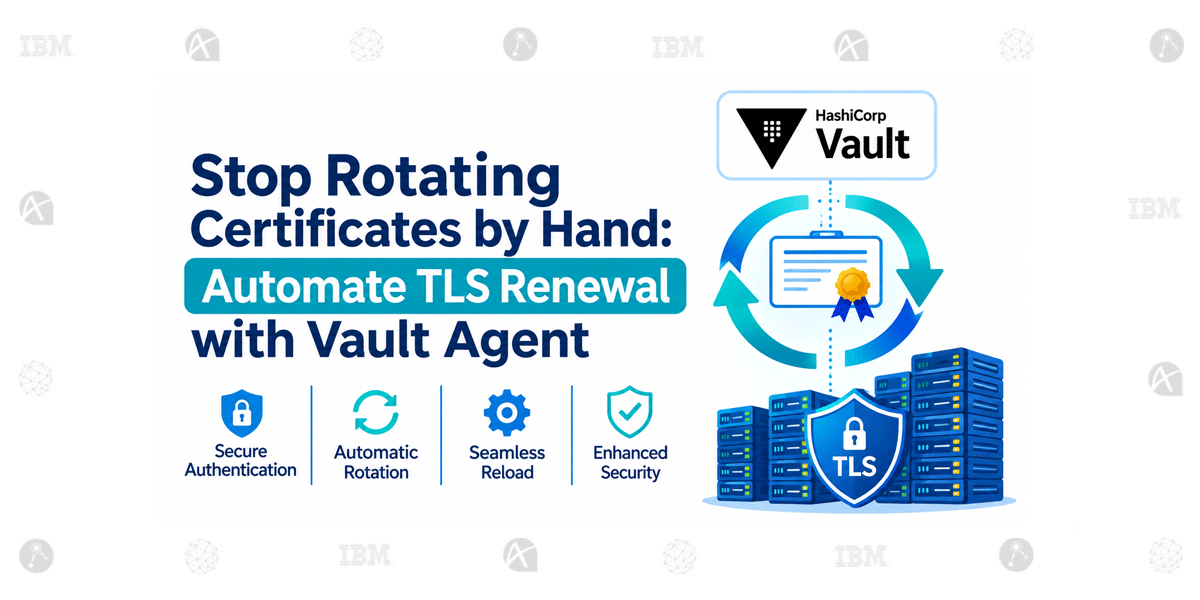
Stop Rotating Certificates by Hand: Automate TLS Renewal with Vault Agent
Every team has a story about an expired certificate. A service stops responding in the middle of the night, alerts start firing, and someone has to locate the certificate, renew it, deploy the updated files, and restart the application.
Manual certificate management may work when there are only a few services. But as infrastructure grows, keeping track of certificate expiry, private keys, renewal schedules, and deployment steps becomes increasingly difficult.
HashiCorp Vault Agent helps automate this process by retrieving certificates from Vault, rendering them to files, and triggering application reloads when certificate files change.
Why Manual Certificate Rotation Fails
Manually renewing certificates introduces several operational challenges.
The process often involves raising renewal requests, copying certificates and private keys to servers, and restarting services during a maintenance window. Private keys may also end up in emails, shared folders, or other locations where they are difficult to control.
As the number of applications and servers increases, the risk of missing a certificate expiry grows. Long-lived certificates further increase the period during which a compromised certificate could remain valid.
Certificate management becomes difficult to maintain when renewal, file deployment, and application updates depend on manual intervention.
Automating certificate rotation reduces reliance on manual intervention and makes certificate lifecycle management more consistent.
How Vault Agent Automates Certificate Management
Vault Agent runs alongside the application and handles authentication, token management, and secret delivery.
Using Vault’s PKI engine, the agent can request short-lived certificates and private keys. It then uses templates to render the certificate and key to the file locations expected by the application.
Instead of manually renewing certificates and copying files, the agent manages the process automatically.
This approach helps centralize certificate issuance through Vault while keeping the certificate delivery process consistent across application environments.
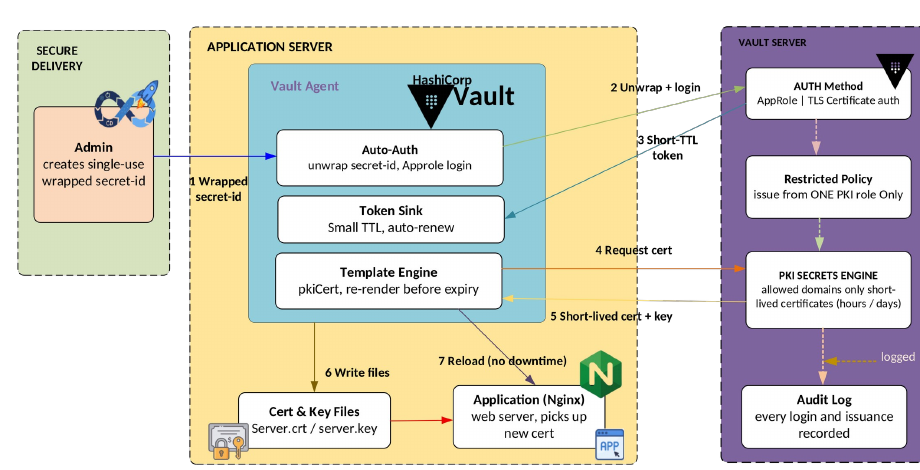
Figure 1: Automated certificate rotation using Vault Agent, Vault PKI, templates, and application reload.
Understanding the Certificate Rotation Cycle
Certificate rotation is not just about issuing a new certificate. The application must also receive the updated files before the current certificate expires.
Vault Agent manages this cycle by tracking the expiry of rendered certificates and requesting replacements as they approach the end of their validity period.
The process typically follows these steps:
- Vault Agent authenticates with Vault.
- The agent obtains the required token and manages its renewal.
- The agent requests a certificate through Vault’s PKI engine.
- Vault issues a certificate and private key.
- Vault Agent renders the certificate and key to the required files.
- As expiry approaches, the agent requests a renewed certificate and updates the files.
The agent also renews its own token before expiry. If token renewal fails, it can log in again to restore access.
This keeps both authentication and certificate lifecycle management moving without depending on someone manually tracking renewal dates.
Automatic Application Reload Without Manual Intervention
Updating certificate files is only part of the process. The application must also start using the new certificate.
Vault Agent templates can be configured with a reload action that runs when a rendered file changes. For example, the action can signal a web server to reload its configuration and pick up the updated certificate.
This eliminates the need for a manual restart every time a certificate is renewed and can help avoid service interruption during certificate updates.
Certificate files can be refreshed and the application can be triggered to reload them automatically, reducing the need for manual certificate deployment and restart activities.
The reload behaviour should be validated with the application and server in use to ensure that the new certificate is applied as expected.
Security Controls for Automated Certificate Rotation
Automating certificate renewal should not mean giving the agent unrestricted access to Vault. The authentication method, token lifecycle, and PKI permissions must be tightly controlled.
Several security controls help protect the process:
- Wrapped token: The agent’s initial credential can be delivered as a single-use, short-lived wrapped token. If someone unwraps it before the agent, the agent’s unwrap operation fails, helping expose tampering.
- Restricted policy: The agent should have permissions limited to the intended PKI role and certificate issuance operations.
- Short token TTL: Tokens should have a short time-to-live and renew automatically, reducing the period of exposure if a token is compromised.
- Allowed names only: The PKI role should restrict certificate requests to approved domain names.
- Short certificate validity: Certificates valid for hours or days limit the usefulness of a leaked certificate or key.
- TLS authentication: Vault Agent can authenticate using a TLS certificate instead of relying on a stored secret.
These controls help reduce credential exposure while ensuring the agent can perform the certificate operations it needs.
Monitoring Certificate Renewal in Production
Automated rotation still requires monitoring. A renewal failure, authentication issue, or unexpected template behaviour can prevent updated certificates from reaching an application.
Vault Agent monitors token and certificate lifetimes, renews them before expiry, and logs its actions. Production monitoring should include renewal failures and Vault audit logging so certificate issuance and related activity remain traceable.
Before deploying the workflow to production, test the complete rotation cycle in a controlled environment.
One practical approach is to configure a two-minute certificate lifetime in a lab and observe the entire sequence:
- Certificate issuance
- Renewal
- Template re-rendering
- File update
- Application reload
This test helps verify that the complete workflow operates as expected before using it with production certificates.
Frequently Asked Questions
1. What is HashiCorp Vault Agent used for in certificate rotation?
Vault Agent authenticates with Vault, manages its token lifecycle, retrieves certificates through Vault’s PKI engine, and renders certificates and private keys to application-accessible files.
2. How does Vault Agent automatically renew certificates?
The agent tracks certificate expiry and requests a replacement as the certificate approaches the end of its validity period. It then re-renders the updated certificate and key files.
3. Can Vault Agent reload an application after certificate renewal?
Yes. Templates can be configured to trigger reload actions when rendered files change, allowing applications such as web servers to reload their configuration and use the updated certificate.
4. How can Vault Agent certificate rotation be secured?
Security can be strengthened with wrapped tokens, restricted Vault policies, short token TTLs, PKI roles limited to approved names, short-lived certificates, and TLS-based authentication.
5. What should be tested before deploying automatic certificate rotation to production?
Test the complete workflow in a lab, including certificate issuance, renewal, template rendering, file updates, and application reloads. Monitor renewal failures and enable audit logging to track issuance activity.
Conclusion
Automating certificate rotation with Vault Agent helps eliminate repetitive renewal tasks and reduces the risk of expired certificates disrupting services. By combining short-lived certificates, secure authentication, restricted PKI permissions, template rendering, and automatic reloads, organizations can make certificate management more predictable and operationally manageable.
The key to a reliable implementation is not just automating renewal, but also restricting issuance permissions, monitoring failures, and testing the complete rotation and reload cycle before production deployment.