How Red Hat OpenShift AI Streamlines Modern IT Processes
In this blog, we will learn how Red Hat OpenShift AI Streamlines Modern IT Processes.
Organizations are increasingly adopting Generative AI (Gen AI) to modernize IT operations and reduce the manual effort involved in handling service requests. Employees often spend significant time submitting IT tickets, while IT teams invest equal effort in reviewing, validating, and resolving those requests.
The IT Self-Service Agent AI Quickstart demonstrates how agentic AI on Red Hat OpenShift AI can automate enterprise IT workflows, accelerate ticket resolution, and improve employee experience through intelligent automation.
This ready-to-deploy solution provides a reusable AI framework that organizations can extend across multiple IT processes—not just a single use case.
What Is the IT Self-Service Agent AI Quickstart?
The IT Self-Service Agent AI Quickstart is a production-ready reference architecture designed to help enterprises quickly implement AI-driven IT automation.
It includes:
- Intelligent request routing
- AI agent services
- Enterprise knowledge bases
- Integration dispatcher services
- Evaluation and testing frameworks
While the quickstart uses a laptop refresh workflow as an example, the same architecture can support:
- Access request automation
- Privacy impact assessments
- RFP generation
- Software license approvals
- Internal compliance workflows
- Employee onboarding requests
This flexibility makes it an ideal starting point for organizations building enterprise AI agents on open source infrastructure.
What Are Red Hat AI Quickstarts?
AI Quickstarts are prebuilt, industry-focused AI use cases created for Red Hat AI platforms. They enable teams to rapidly deploy working AI solutions without starting from scratch.
Each quickstart is designed to:
- Deploy quickly
- Demonstrate real enterprise scenarios
- Provide hands-on learning experiences
- Accelerate AI adoption on enterprise infrastructure
These quickstarts allow organizations to move from experimentation to production faster using Red Hat OpenShift AI.
Business Benefits of AI-Powered IT Automation
✅ Faster IT Request Submission
AI agents guide employees through request creation, ensuring all required details are provided before submission. This significantly reduces delays caused by incomplete tickets.
✅ Improved Compliance and Standardization
Automated validation ensures requests follow organizational policies and workflows, minimizing manual review effort.
✅ Reduced Request Rejections
Incomplete or inaccurate submissions often create frustration. AI assistance improves request quality and reduces back-and-forth communication.
✅ Faster Ticket Resolution
Automated workflows shorten resolution times, improve IT team productivity, and increase overall service efficiency.
Meeting Employees Where They Work
Successful AI adoption depends on usability. Instead of introducing new tools, this solution integrates AI agents into platforms employees already use daily.
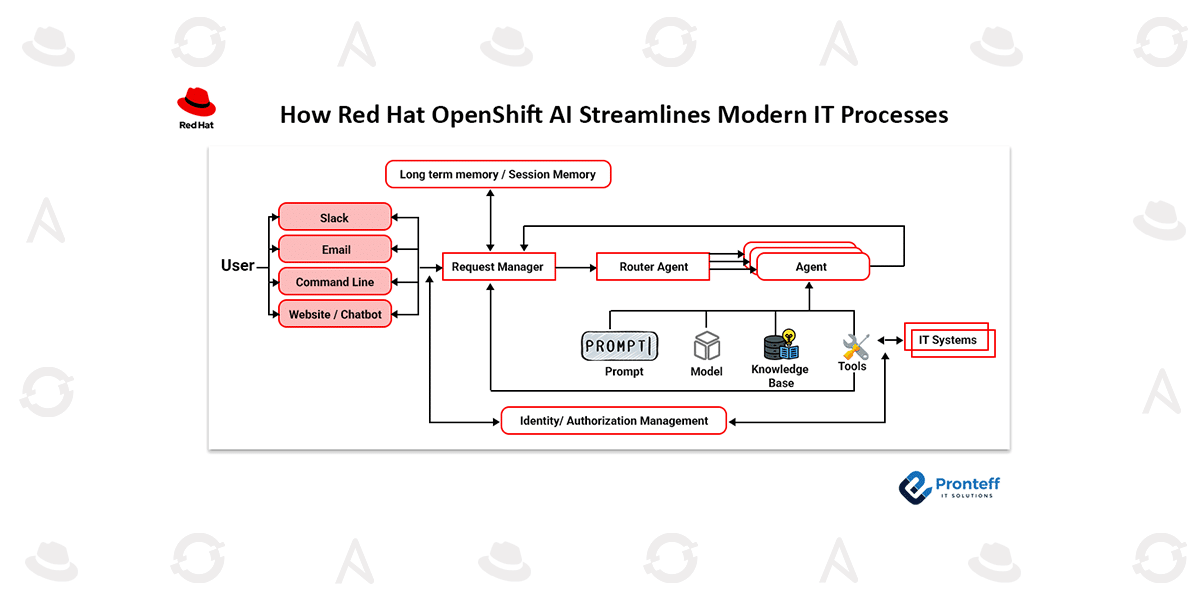
The AI self-service agent supports integrations with:
- Slack
- Email systems
- ServiceNow
Employees interact with AI directly inside familiar communication channels, improving adoption rates and reducing organizational change management efforts.
The architecture enables AI agents to receive user requests, access enterprise knowledge sources, call APIs, and orchestrate automated IT workflows seamlessly.
Getting Started with the AI Quickstart
Deployment Time: Approximately 60–90 minutes
The quickstart enables rapid hands-on experimentation. Within about an hour, organizations can deploy a working AI agent capable of managing a full laptop refresh process.
Prerequisites
Before deployment, ensure you have:
- A running Red Hat OpenShift environment
- Required local development tools
- Access to a supported Large Language Model (LLM)
Installation Steps
Clone the repository:
git clone https://github.com/rh-ai-quickstart/it-self-service-agent.git
cd it-self-service-agent
Set your namespace:
export NAMESPACE=your-namespace
Configure LLM settings:
export LLM=llama-3-3-70b-instruct-w8a8
export LLM_ID=llama-3-3-70b-instruct-w8a8
export LLM_API_TOKEN=your-api-token
export LLM_URL=https://your-llm-endpoint
Log in to OpenShift:
oc login --server=https://your-cluster:6443
Deploy the AI quickstart:
make helm-install-test NAMESPACE=$NAMESPACE
The deployment automatically creates the required OpenShift pods that power the AI agent ecosystem.
Exploring the Agentic Laptop Refresh Workflow
After deployment, you can explore multiple interaction methods:
- Submit requests via command-line interface
- Use Slack to request device refresh workflows
- View requests directly in ServiceNow
- Enable email-based AI interactions
This demonstrates how AI agents operate across multiple enterprise communication channels.
Evaluating AI Agents with DeepEval
Generative AI systems behave differently from traditional deterministic applications. Testing requires specialized evaluation methods.
The quickstart integrates the DeepEval open source framework to validate:
- Policy compliance
- Information collection accuracy
- Conversation quality
- Workflow completion success
Evaluation helps organizations confidently deploy AI agents into production environments.
AI Observability with OpenTelemetry
Agentic AI systems involve complex interactions between services, APIs, and models. Visibility is critical for troubleshooting and optimization.
Using OpenTelemetry within Red Hat OpenShift AI, teams can:
- Track request flows across services
- Monitor LLM API interactions
- Identify performance bottlenecks
- Analyze user behavior patterns
Distributed tracing ensures enterprise-grade reliability and operational insight.
Securing Enterprise AI Agents
Enterprise AI deployments must include strong safety controls. The quickstart introduces built-in AI guardrails:
- PromptGuard to prevent prompt injection attacks
- LlamaGuard for content moderation and safe AI responses
These safeguards help organizations deploy AI responsibly while maintaining governance standards.
What You Will Learn
By completing this AI quickstart, you will:
- Deploy an enterprise AI agent system on Red Hat OpenShift AI
- Understand agentic AI architecture design
- Automate IT workflows across multiple channels
- Evaluate AI performance using testing frameworks
- Implement AI safety and governance controls
- Gain operational visibility using observability tools
- Customize AI automation for your organization’s workflows
Why This Matters
The IT Self-Service Agent AI Quickstart demonstrates how Generative AI, automation, and enterprise open source platforms combine to transform traditional IT service management.
Instead of manual ticket handling, organizations can implement intelligent AI agents that improve efficiency, enhance employee experience, and scale IT operations securely.