Architecture & Deployment Guide for SAS Viya on OpenShift
In this blog, we will learn what the Architecture and Deployment Process for SAS Viya on OpenShift is.
This two-part series explores the key technical aspects of deploying the SAS Viya platform on Red Hat OpenShift. In this first part, we focus on architecture and deployment fundamentals, while the second part will dive into areas such as security, infrastructure management, and storage considerations.
Introduction to SAS Viya and Cloud-Native Design
Since its release in 2020, SAS Viya has evolved into a fully containerized analytics platform built on cloud-native principles. Designed to run on Kubernetes, it leverages container orchestration to deliver scalability, flexibility, and resilience.
SAS supports multiple Kubernetes distributions across both public and private cloud environments. Many organizations choose private cloud deployments due to regulatory requirements or strategic IT decisions. In such cases, Red Hat OpenShift serves as a strong foundation, offering enterprise-grade Kubernetes along with integrated DevSecOps capabilities.
The long-standing collaboration between SAS and Red Hat has further strengthened this ecosystem. While earlier SAS solutions relied on Red Hat Enterprise Linux, modern SAS Viya container images are built using Red Hat Universal Base Images. Additionally, SAS integrates with OpenShift-native components such as the Ingress Operator, GitOps tooling, certificate utilities, and security frameworks like Security Context Constraints (SCCs).
Reference Architecture for SAS Viya on OpenShift
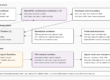
SAS Viya is not a single application but a comprehensive suite covering the entire AI and analytics lifecycle. This results in diverse workload types, each with specific requirements for compute, memory, storage, and security.
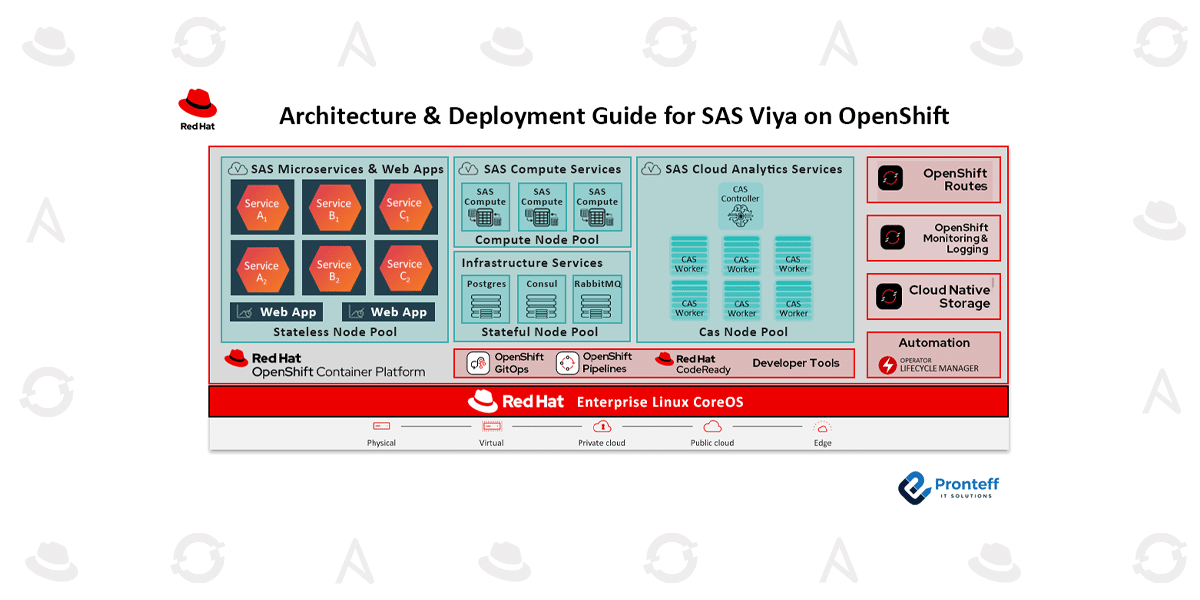
One major advantage of running SAS Viya on OpenShift is enhanced scalability. To optimize performance, SAS recommends categorizing workloads and assigning them to specific node groups (machine pools). This ensures that each workload receives appropriate resources.
However, using multiple node pools is optional. In environments such as on-premises or bare-metal deployments, fixed hardware capacity may make node segmentation inefficient. In such cases, a unified worker pool with Kubernetes scheduling mechanisms (like resource limits and priorities) can provide better utilization and simpler operations.
Even without separate node pools, two best practices should be followed:
- Apply predefined node labels (without taints) to guide workload placement.
- Disable CAS auto-resourcing if dedicated node pools are not used.
Key Workload Categories
1. Cloud Analytic Services (CAS)
CAS is the core analytics engine of SAS Viya. It operates as an in-memory processing system where data is loaded, analyzed, and optionally persisted to disk.
- Highly CPU- and memory-intensive
- Requires shared persistent storage
- Supports two modes:
- SMP (Single-node): One CAS instance
- MPP (Distributed): Multiple pods with controller and worker roles
In typical configurations, CAS pods consume most of a node’s resources. Without a dedicated node pool, resource limits can be adjusted to allow coexistence with other workloads.
2. Compute Services
These services handle traditional SAS workloads, executing user-submitted code either interactively or in batch jobs.
- Highly parallelizable
- Scales based on available cluster resources
- Ideal for autoscaling scenarios (e.g., handling peak workloads like nightly processing)
3. Microservices and Web Applications
SAS Viya includes numerous microservices and user-facing applications.
- Provide functionalities such as authentication, auditing, and UI access
- Follow cloud-native (12-factor app) principles
- Stateless by design
Examples include analytics dashboards and model management tools.
4. Infrastructure Services
These services manage metadata and internal system operations.
- Include components like PostgreSQL, Consul, and RabbitMQ
- Store critical system data
- Require persistent storage and are I/O intensive
Platform Compatibility and Ecosystem
SAS Viya can run on a wide range of OpenShift-supported environments, including:
- On-premises data centers
- Public cloud platforms
- Virtualized environments (e.g., VMware)
- Managed services such as ROSA (AWS) and ARO (Azure)
SAS ensures compatibility with newer OpenShift versions shortly after their release. At the time referenced, SAS Viya supports OpenShift versions 4.19 through 4.21, aligned with Kubernetes versions 1.32 to 1.34.
Supporting OpenShift Components
Several OpenShift features play a key role in SAS Viya deployments:
- Ingress Operator: Handles routing and supports specific cookie management requirements
- Routes: Provides native OpenShift traffic routing
- cert-utils-operator / cert-manager: Manages TLS certificates
- SCCs (Security Context Constraints): Defines pod permissions and enforces security policies
OpenShift Deployment Methods
OpenShift offers flexible deployment options:
- Assisted Installer: Web-based and user-friendly
- Agent-based Installer: Suitable for disconnected environments
- Installer-Provisioned Infrastructure (IPI): Fully automated setup
- User-Provisioned Infrastructure (UPI): Maximum control with manual configuration
- Hosted Control Planes (HCP): Centralized control plane for multiple clusters
SAS Viya Deployment Approaches
There are three main ways to deploy SAS Viya:
1. Manual Deployment
- Uses YAML templates customized with tools like Kustomize
- Requires cluster-admin privileges
- Involves collaboration between the SAS and OpenShift teams
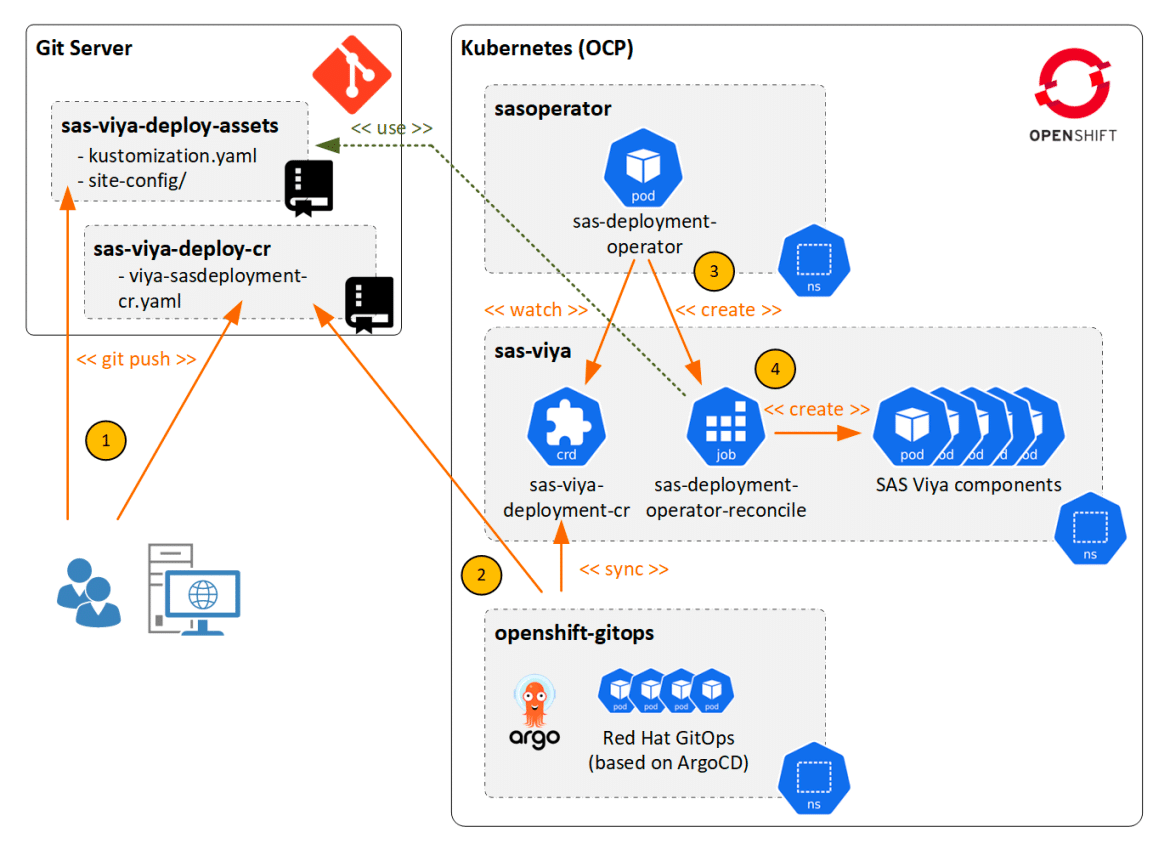
2. SAS Deployment Operator
- Automates deployment and updates
- Uses custom resources (SASDeployment)
- Integrates with GitOps for CI/CD workflows
- Reduces manual intervention
3. sas-orchestration Utility
- Combines manifest generation and deployment
- Can be used manually or in pipelines
- Supports tools like Jenkins and GitHub Actions
Deployment Workflow and Collaboration
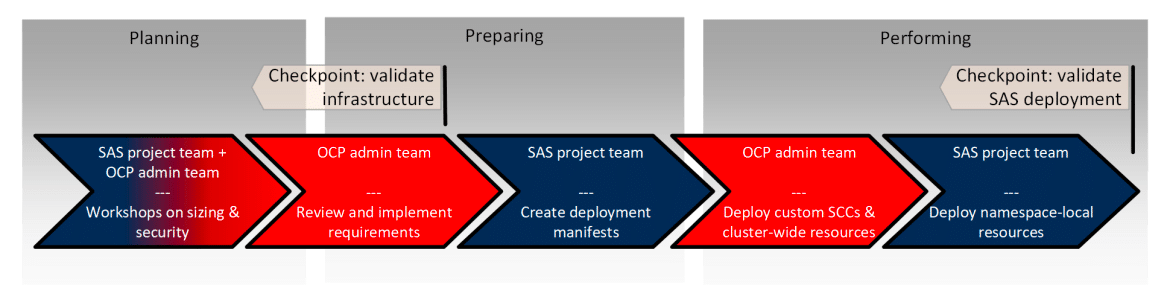
Deploying SAS Viya is a collaborative effort involving multiple teams. The process typically includes:
Planning
- Joint discussions on architecture, security, storage, and networking
Preparation
- OpenShift admins prepare infrastructure
- SAS team customizes deployment configurations
Execution
- Teams work together to deploy resources
- Responsibilities split based on permission levels
Conclusion
This first part provided an overview of deploying SAS Viya on OpenShift, covering architecture, workload design, and deployment strategies. These insights help teams prepare for successful implementation.
In the next part, we will explore deeper topics such as security practices, storage integration, and cluster management to further optimize your deployment.