

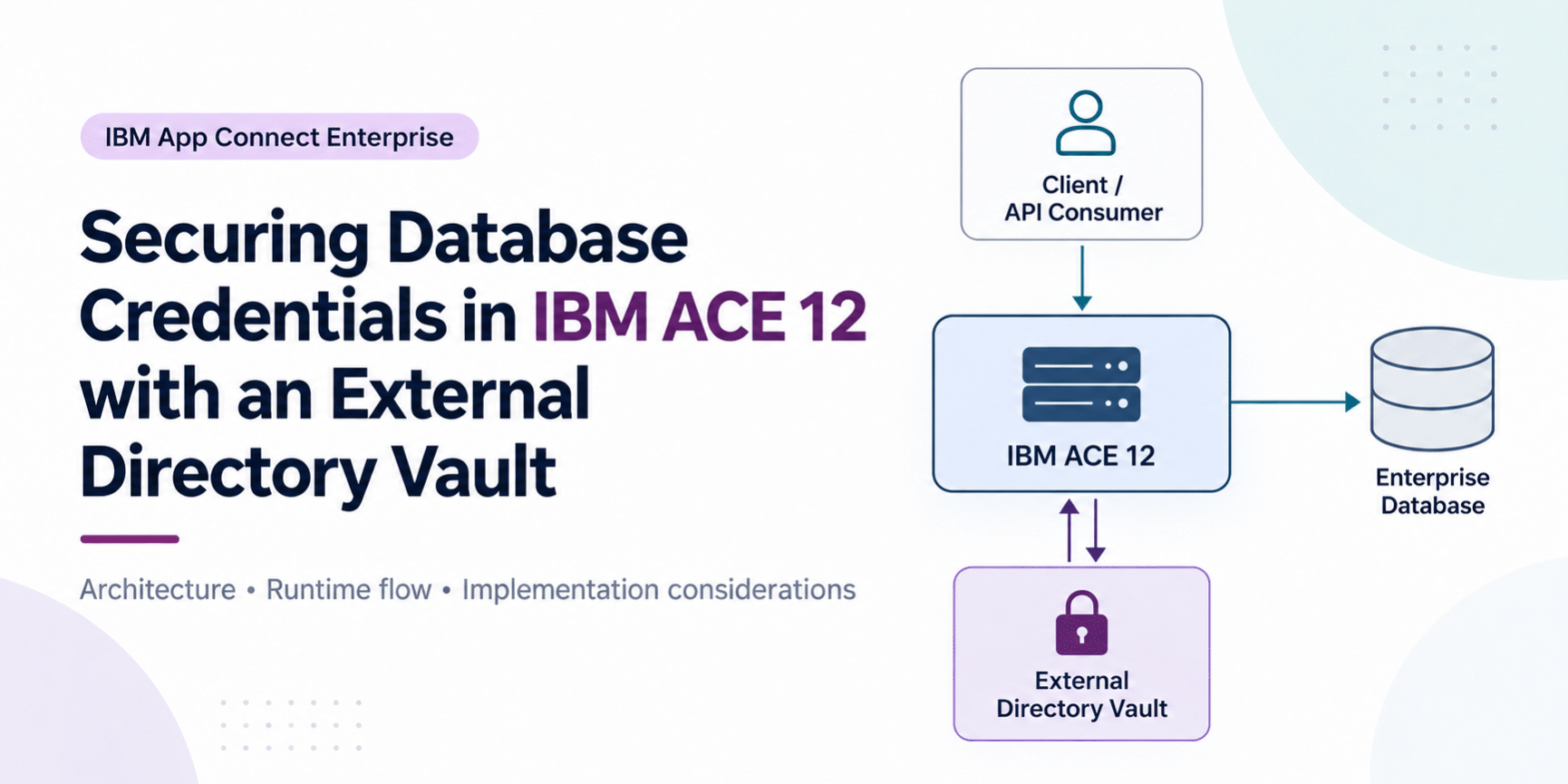
By Anand Macherla · Updated 1st October 2026 · Approx. 10-minute read
Secure ODBC Database Credentials in IBM ACE 12 with an External Directory Vault
Your message flow should know which database identity it needs — not where the password is hidden. Here is how IBM App Connect Enterprise 12 can keep ODBC credentials encrypted outside a server’s work directory and make the same vault available to multiple integration servers.
TL;DR
Starting with IBM App Connect Enterprise 12.0.9.0, an External Directory Vault can be created outside of an integration server’s work directory and shared by multiple integration servers. ACE stores credentials in encrypted form, while the flow continues to work with the ODBC data source rather than carrying a database password in the flow logic or deployment package.
In this article
The real problem: a database password should not become deployment data
Consider a common ACE deployment: three integration servers connect to the same DB2 data source. The applications may be deployed independently, but they all need the same database identity.
Without a clean credential-management pattern, teams can end up coupling database secrets to server-specific configuration, deployment procedures, scripts, or documentation. That creates an operational problem: every credential change becomes something the application and platform teams must coordinate carefully.
The better separation is straightforward:
- The message flow owns integration logic.
- The ODBC DSN identifies the database connection.
- The ACE vault protects the database username and password.
- The server configuration tells ACE where the shared vault is located.
This is exactly where an External Directory Vault becomes useful. The vault is no longer tied to one independent integration server’s work directory, so multiple ACE runtimes can point to a common encrypted credential store.
First, a naming trap: “External Directory Vault” does not mean HashiCorp Vault
This distinction matters. An ACE External Directory Vault is an IBM App Connect Enterprise vault stored in a filesystem directory outside the integration server’s work directory. ACE still owns the vault format and encrypts the credential records.
It is not the same thing as integrating ACE directly with an enterprise secrets manager such as HashiCorp Vault, CyberArk, or a cloud key vault. ACE has separate capabilities for obtaining credentials from an external source. If your organization’s requirement is “the database password must live only in our enterprise secrets manager,” that is a different architecture.
The simplest mental model
External Directory Vault = an ACE-managed encrypted vault in an external filesystem directory.
External credential provider = ACE obtains credentials from another source or secrets-management mechanism.
What changed in ACE 12.0.9.0?
ACE had vault-based encrypted credential storage before this release. The important change in 12.0.9.0 was the introduction of the External Directory Vault: a vault that can sit outside one server’s work directory and be used concurrently by multiple configured integration servers. Integration nodes can also be configured to use an external directory vault.
| Approach | Where credentials are held | Typical scope | Best fit |
|---|---|---|---|
| Integration Server Vault | Inside the integration server work directory | Specific integration server | Isolated server-specific credentials |
| External Directory Vault | ACE encrypted vault in an external filesystem directory | Multiple configured ACE servers or nodes | Shared ACE-managed credentials |
| External Credential Provider | External file, key vault, or other credential source | Depends on provider and server configuration | Enterprise secrets-management integration |
Architecture: keep runtime logic and credential storage separate
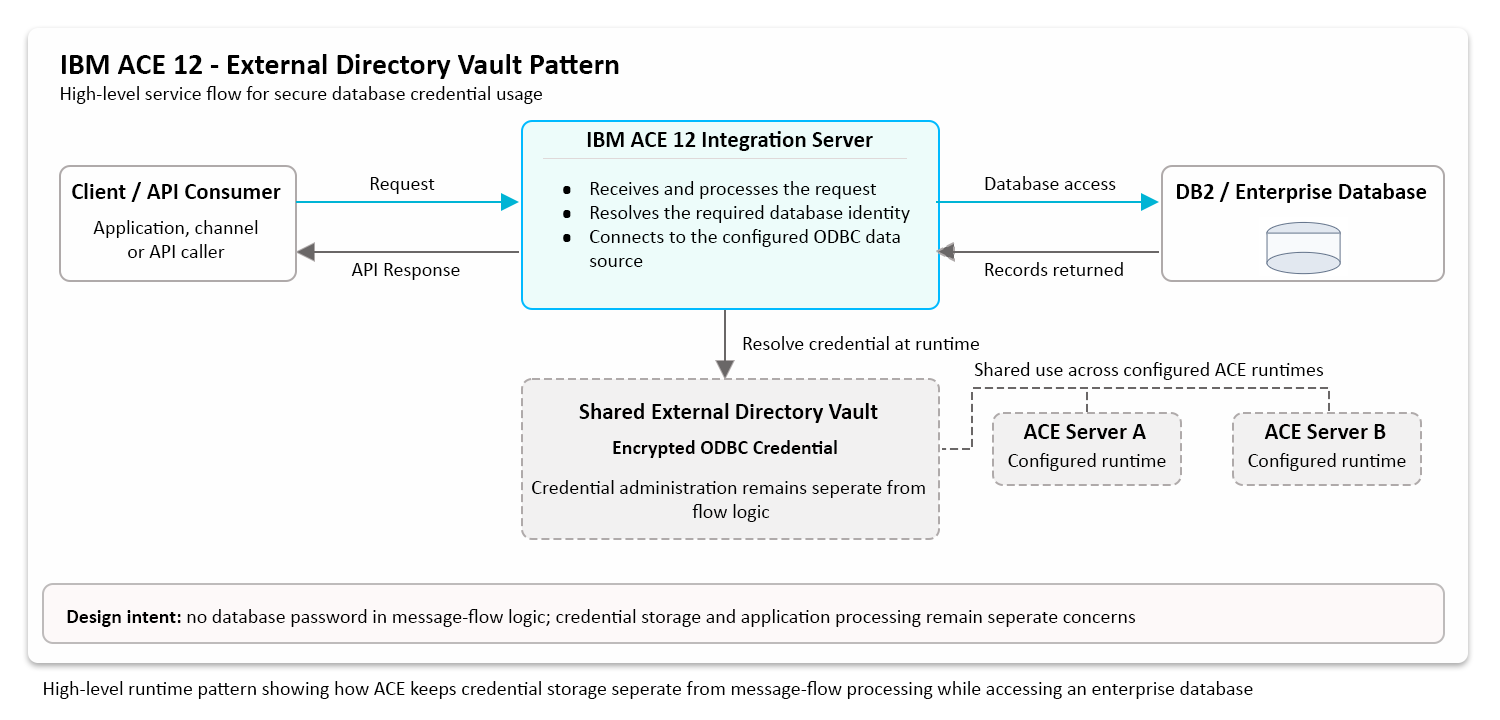
At runtime, the flow does not need to carry the database password. ACE knows the configured external vault location, obtains access to that vault using the vault key supplied through an approved startup mechanism, resolves the ODBC credential, and uses it when establishing the database connection.
The practical benefit is not simply “the password is encrypted.” It is the separation of responsibilities: developers can build the message flow around the data source, while operations can manage the credential separately.
Implementation approach: from design to runtime validation
A successful implementation involves more than creating a vault and storing a database password. The design needs to account for the ACE runtime, ODBC connectivity, credential ownership, vault access, validation, and the operating model that will support the solution after go-live.
Implementation focus
- Assess the ACE and database environment
Confirm the ACE version, integration-server model, target database, ODBC data source, service identities, operating system, network path, and the teams responsible for application, database, and platform administration. - Define the shared vault design
Select the protected external location that will hold the ACE-managed vault and identify which integration servers are expected to consume credentials from it. Access to this location should be restricted to the required runtime and administrative identities. - Onboard the database credential
Create the required ODBC credential in the External Directory Vault using the approved ACE administration process. The credential identity must align with the database connection design used by the integration flow. - Associate the ACE runtime with the vault
Configure the required integration server or servers so that the runtime knows which External Directory Vault to use. This creates the separation between application logic and credential storage without embedding the database password into the flow. - Protect access to the vault
The encrypted credential store still requires controlled access. The vault location, the mechanism used by ACE to open it, operating-system permissions, service identities, backup handling, and administrative access should all follow the organization’s security controls. - Validate database connectivity separately
Confirm that the ACE host can reach the database and that the ODBC data source is correctly defined. This isolates basic network and database configuration issues before testing the full application path. - Prove the complete runtime path
Deploy the message flow and invoke the real application path. The final validation should demonstrate that ACE receives the request, resolves the required credential from the configured vault, establishes the database connection, retrieves the expected data, and returns the application response. - Establish the operating model
Before production handover, document credential rotation, access ownership, change control, backup and recovery, troubleshooting responsibilities, and the process for adding additional integration servers to the shared vault design.
Validation: prove each layer, then prove the complete path
A successful administrative change does not prove that the application can use the database credential at runtime. Validation should be layered so that each dependency is isolated before the final end-to-end test.
Layer 1 — network and database reachability
Confirm that the ACE runtime host can reach the target database through the expected network path and port.
Layer 2 — ODBC data source
Validate the ODBC data source independently. This proves the basic database-client configuration without assuming that the External Directory Vault integration is already correct.
Layer 3 — vault association and runtime access
Confirm that the integration server starts with access to the intended External Directory Vault and can resolve the expected ODBC credential under its runtime identity.
Layer 4 — application-level validation
Invoke the deployed message flow and execute the real database operation. This is the final proof because it validates the same credential resolution and connection path that production traffic will use.
Key lesson: a connectivity check and an application runtime test answer different questions. Both are useful, but only the end-to-end flow proves that the complete design is working.
What this pattern protects — and what it does not
An External Directory Vault improves credential handling, but it should not be presented as a complete secrets-management program.
| It helps with | It does not solve by itself |
|---|---|
| Keeping the database password out of message-flow logic and normal deployment artifacts | Over-privileged database accounts |
| Encrypting credential records in an ACE-managed vault | Compromise of the ACE host or runtime identity |
| Sharing one ACE vault across multiple configured runtimes | Poor protection of the external vault key |
| Separating application logic from credential administration | Database network encryption such as TLS |
| Providing an operational location for ACE credentials | Automatic creation of dynamic database users, leases, or enterprise-wide secret rotation |
Production checklist
- Restrict the vault directory: only the required ACE service identities and administrators should have access.
- Protect the vault key separately: do not store it casually beside the encrypted vault data.
- Keep secrets out of Git: no real database password or vault key should appear in repositories, build artifacts, screenshots, or runbooks.
- Use least privilege: the database account should have only the permissions the message flow requires.
- Plan credential rotation: document how credentials are updated, whether a server restart is required in your exact scenario, and how connection pools are refreshed.
- Back up and restore deliberately: protect backup material and test the recovery path rather than assuming the vault directory alone is enough.
- Secure the database connection: credential storage and transport security are separate controls.
- Monitor operational access: changes to vault permissions, service identities, and credential administration should be auditable through your platform controls.
Five common failure points worth checking first
- The server points to the wrong directory
Verify that the integration server is associated with the intended External Directory Vault location. A wrong or stale path can appear to be a credential problem when the actual issue is runtime configuration. - The runtime cannot obtain the correct vault key
An encrypted vault is useful only if ACE can open it at startup. Check the configured key-delivery method and the identity under which the server is running. - The ODBC credential name does not match the expected data source
For ODBC, naming matters. Confirm that the credential identity and DSN used by the flow are aligned with the way the database connection has been configured. - Filesystem permissions block the ACE service account
The vault may exist, and the key may be correct, but the OS can still prevent the integration server from reading the directory. Test using the same service identity that runs ACE. - The test validates the DSN but not the actual runtime path
A connectivity utility can prove the ODBC layer and still miss a problem in the server’s external-vault configuration. Always finish with an application-level request that causes ACE to access the database through the deployed flow.
Frequently asked questions
Is an ACE External Directory Vault the same as HashiCorp Vault?
No. The External Directory Vault discussed here is an ACE-managed encrypted credential store located in a filesystem directory outside an integration server’s work directory. Integrating ACE with an enterprise secrets manager is a separate design.
Can multiple integration servers use the same external vault?
Yes. That is one of the main reasons the capability was introduced. IBM documents that credentials in an External Directory Vault can be accessed by multiple configured integration servers, and integration nodes can also be configured to use an external directory vault.
What ACE version is required?
External Directory Vault support was introduced in IBM App Connect Enterprise 12.0.9.0.
Does the message flow contain the database password?
It should not. The flow works with the database connection/data source, while ACE obtains the credential from its configured credential provider.
Is a successful ODBC connectivity test enough?
No. It confirms the database-client layer, but the final validation should invoke the deployed ACE flow so that the real runtime path also proves vault access, credential resolution, database authentication, and application response handling.
When should I use an enterprise secrets manager instead?
If your requirement includes centralized enterprise policy, dynamic database credentials, automated leasing/rotation, or a mandate that secrets remain in an external secrets platform, evaluate ACE’s external credential-provider pattern or another supported integration with that secrets platform rather than assuming the External Directory Vault provides the same lifecycle capabilities.
The takeaway
The strongest reason to use an ACE External Directory Vault is not that it adds another place to store a password. It gives you a cleaner boundary between integration logic and credential administration.
For ACE 12 environments where multiple integration servers need the same protected ODBC identity, the pattern provides a clear separation of concerns: shared encrypted credential storage, controlled runtime access, independent database connectivity validation, and an end-to-end application test before production handover.
Just keep the scope clear. This is an ACE credential-storage capability, not automatically a substitute for an enterprise secrets-management platform.
What should we cover next?
If you work with IBM App Connect Enterprise and enterprise security, the natural next question is: When should ACE use its External Directory Vault, and when should credentials come from HashiCorp Vault or another enterprise secrets manager?
That comparison will be the next article in this integration-security series. Bookmark the blog or follow the site’s social channel so you do not miss it.