

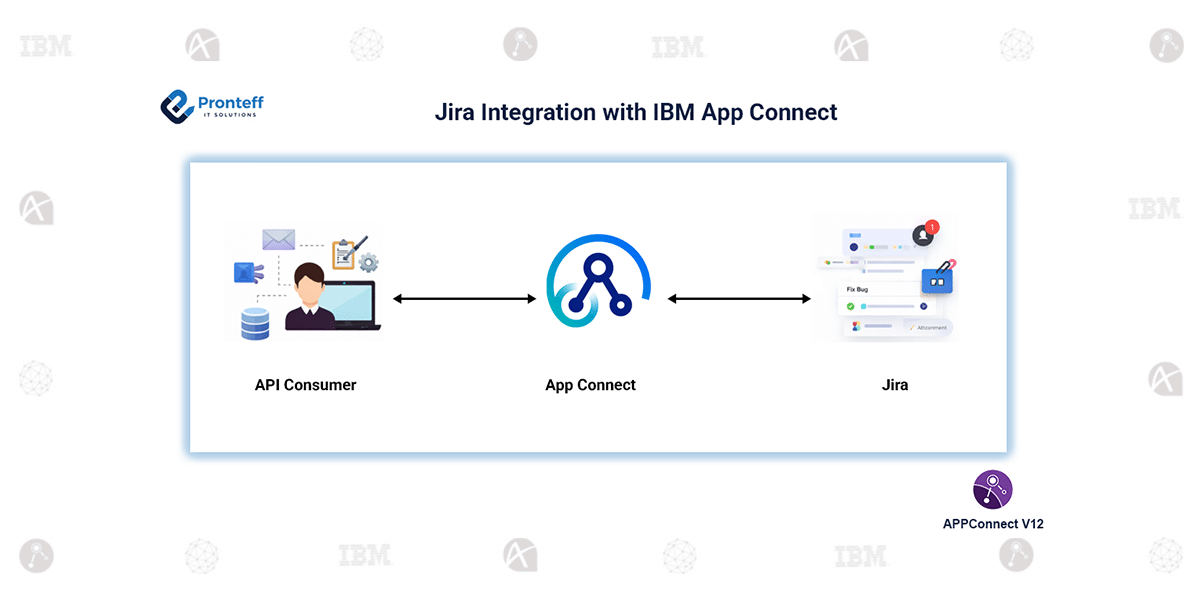
Jira Integration with IBM App Connect
In this blog, we will learn how to integrate Jira with IBM App Connect.
Integrating Jira with IBM App Connect enables organizations to automate issue tracking and synchronize project data across multiple systems. With App Connect’s low-code capabilities and Jira’s robust issue management features, teams can build efficient, reliable, and scalable integrations tailored to their business needs.
Configuration:
- Create a message flow and add a Jira Request node.
- Create a Jira policy to securely store connection details and configure the Vault key and Work directory.
- Create an Integration Server using the same Vault key and Work directory, and deploy the message flow and policy.
- Generate Jira API Token
Log in to your Jira (Atlassian) account and generate an API token from:
https://id.atlassian.com/manage-profile/security/api-tokens - Update the Jira policy with the Credential Name, Jira Host/Port and Jira Authorization method.
- Associate the Jira policy with the Jira Request node and map required fields such as project, issue type, summary, and description.
- Invoke the message flow and verify that the Jira issue is successfully created.

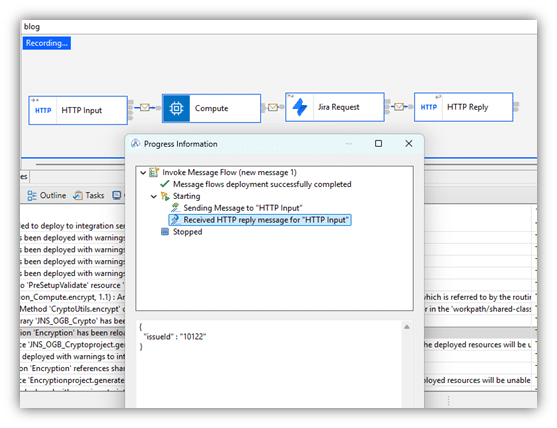
Jira integration with IBM App Connect begins by creating a message flow that includes an appropriate input node, such as an HTTP Input, along with a Jira Request node to interact with Jira. A Jira policy is created to securely store the connection details, where the Vault key and work directory are configured to manage credentials safely.
An Integration Server is then set up using the same Vault key and work directory defined in the Jira policy, and the message flow along with the policy is deployed to this server. To enable secure communication, an API token is generated from the Atlassian account and configured in the Jira policy.
The Jira policy is associated with the Jira Request node, and required fields such as project, issue type, summary, and description are mapped within the message flow. Once configured, the message flow can be invoked to create Jira issues, and the successful creation of tickets can be verified directly in Jira.