
RHEL 9 and 10 on GitHub Actions: Architecture, Security and Trade-offs
A production-minded look at Red Hat Enterprise Linux runner images, operating-system parity, pipeline trust boundaries, and what to validate before adoption.
A build that passes on Ubuntu but fails on a RHEL production host is more than an annoying red pipeline. It can expose assumptions about system libraries, package availability, service behaviour, or security policy that only surface late in delivery.
GitHub and Red Hat have introduced RHEL 9 and RHEL 10 images for GitHub-hosted larger runners, currently in public preview. The important change is not simply another Linux option: teams can test software on a Red Hat Enterprise Linux environment without first operating their own runner fleet.
That makes the preview worth evaluating for teams whose production estate is RHEL-based. It does not, by itself, prove that a workload is production-ready or that the whole pipeline is secure.
Why operating-system parity matters
Linux distributions share a kernel lineage and familiar tooling, but they are not interchangeable build environments. System libraries, package names and versions, default services, compiler toolchains and security settings can differ. Those differences become important when an application depends on a specific library ABI, native extension, system package or operating-system behaviour.
Imagine a service whose CI tests run on one distribution while its production image is built and deployed on RHEL. Unit tests may pass, yet packaging or integration tests can fail because a required library is absent, a dependency version differs, or an assumption about the host proves false.
What the RHEL runner images change
The announced images are Linux x64 partner images offered through GitHub-hosted larger runners. GitHub manages the runner infrastructure, while the RHEL image supplies the operating-system foundation. Teams can use that foundation for builds and tests that need RHEL-specific behaviour.
Hosted runners and self-hosted runners are different operating models. Hosted runners reduce the burden of maintaining runner machines; self-hosted runners give an organisation more control over the host, installed software and network placement, but also leave it responsible for maintaining the operating system and runner environment. GitHub’s documentation describes the trade-offs for GitHub-hosted runners and self-hosted runners
Architecture and runtime flow
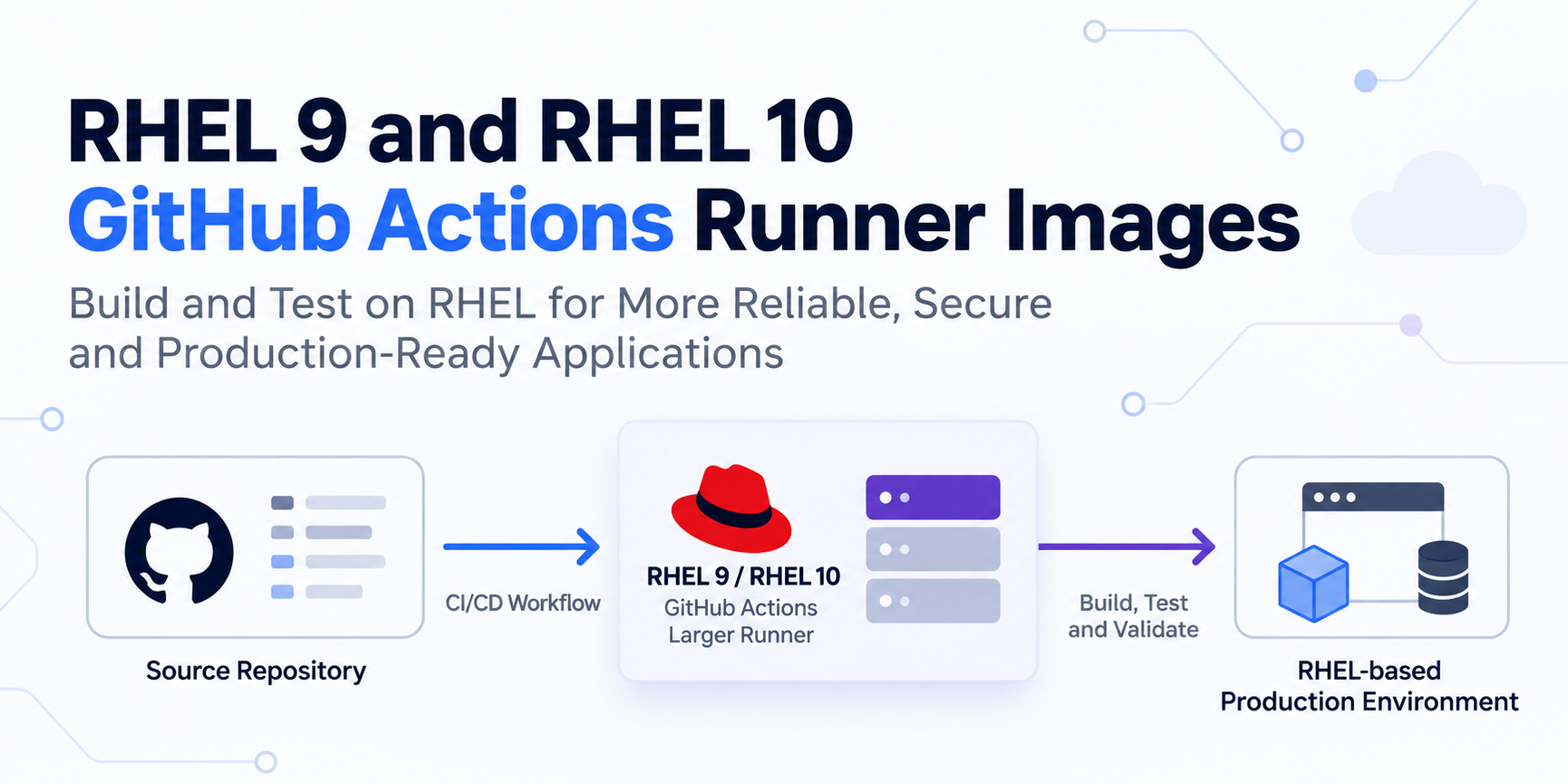
The key flow is straightforward: a repository workflow requests a configured hosted runner; the job executes in that RHEL environment; tests and build outputs are evaluated; and only validated artifacts should move toward release and deployment. Keep the trust boundary around workflow code, credentials, and artifacts explicit.
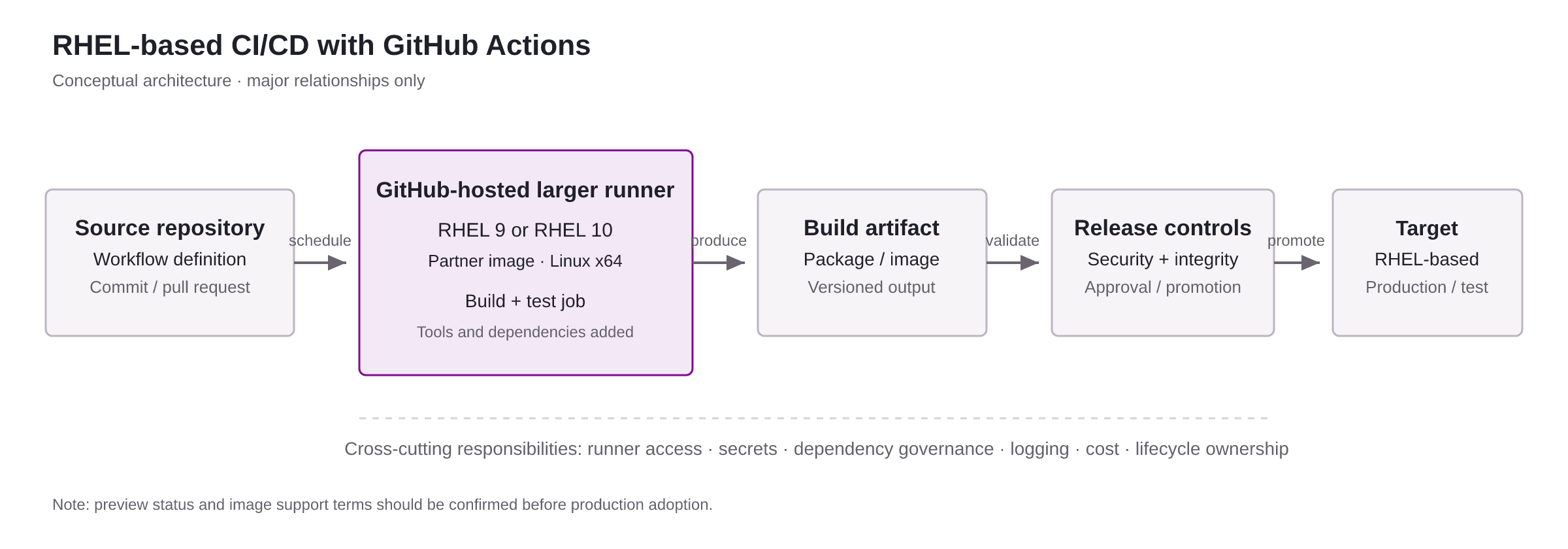
The runner’s operating system is one layer in this flow. Workflow permissions determine what code can access; secret-management policy determines which credentials a job can obtain; dependency controls influence what enters the build; and artifact validation determines what is trusted downstream.
Choosing the right runner model
| Option | Best fit | Main trade-off |
|---|---|---|
| Standard GitHub-hosted Linux runner | General builds where the standard environment is representative enough. | May not reproduce RHEL-specific package and runtime behaviour. |
| GitHub-hosted RHEL larger runner image | Teams that need RHEL 9 or 10 validation while preferring hosted runner operations. | Preview status, plan eligibility, available image capabilities, and billing need to be assessed. |
| Self-hosted RHEL runner | Workloads requiring custom host configuration, private network access, or specialised controls. | The organisation owns patching, hardening, capacity, isolation and lifecycle management. |
These choices are not a simple “hosted versus secure” decision. Security depends on how each model is configured and operated. A self-managed runner can provide control, but it can also increase risk if untrusted pull requests share a host or if the host retains state between jobs.
A staged adoption approach
Identify which builds actually need RHEL parity: native dependencies, system integrations, packaging, compliance tests, or release validation. Avoid moving every pipeline merely because the image exists.
Confirm organisation and plan eligibility, runner-group access, repository scope, concurrency needs, networking constraints, and preview limitations. Treat access to runner groups as a governed resource.
Select a non-critical service with known RHEL dependencies. Record its baseline build time, dependency resolution, test coverage, and failure modes before changing the runner environment.
Review workflow permissions, third-party actions, secret exposure, identity federation, dependency sources, and the handling of untrusted contributions. Prefer narrowly scoped, short-lived credentials where supported by the surrounding platform and services.
Compare test results and artifacts with the existing pipeline. Verify package provenance, vulnerability findings, reproducibility expectations, and the behaviour of downstream deployment stages.
Define ownership for preview changes, failure triage, cost review, and rollback to the previous runner strategy. Reassess the decision when the preview status or available image capabilities change.
What this protects—and what it does not
Using a RHEL runner can reduce environment mismatch and make RHEL-specific compatibility testing more representative. It can also reduce the need to build and maintain a custom runner fleet for that purpose.
It does not guarantee that an application is secure, that dependencies are free of vulnerabilities, that the runner matches every production setting, or that regulatory obligations are satisfied. A secure operating-system baseline is useful, but it is not a substitute for a secure software delivery process.
Red Hat’s is a separate option to evaluate for container workloads. Its trusted, distroless, and micro-sized components may reduce unnecessary software in selected images, but image selection, signature verification, patching, and workload testing remain necessary.
Common mistakes and trade-offs
- Assuming RHEL parity means production parity. Runtime configuration, network policy, external services and production data characteristics can still differ.
- Mixing untrusted code with privileged workflows. A matching OS does not protect secrets from unsafe workflow logic. Review pull-request trust boundaries and permissions.
- Using broad runner access. Scope which repositories can use runner groups and separate sensitive release jobs from routine build jobs.
- Ignoring preview maturity. Public-preview capabilities can change. Do not make a critical release path dependent on an unreviewed preview assumption.
- Optimising only for compatibility. Larger runners, setup time, concurrency, and job duration affect cost and throughput. Measure the whole workflow rather than one build step.
- Treating container hardening as a replacement for pipeline controls. Minimal images can reduce attack surface, but they do not fix vulnerable application code or excessive credentials.
Troubleshooting: symptoms and likely causes
| Symptom | Likely causes to investigate |
|---|---|
| Job remains queued | Runner availability, runner-group access, concurrency limits, plan eligibility or a mismatch between workflow routing and configured runner labels. |
| Dependency installation fails | Package name or repository differences, missing entitlement or repository access, unsupported package versions, or assumptions inherited from another Linux distribution. |
| Build passes, but runtime tests fail | Differences in shared libraries, environment variables, service configuration, filesystem permissions or external dependencies. |
| Security scans still report many findings | Application dependencies, build tools, container layers or generated artifacts may be responsible; changing the runner OS alone does not resolve them. |
| Release workflow behaves differently | Different permissions, secrets availability, artifact promotion rules or environment approvals between validation and release jobs. |
Frequently asked questions
Are RHEL 9 and RHEL 10 GitHub Actions runner images generally available?
Do I need to manage the runner machine?
Will RHEL runners eliminate “works on my machine” problems?
Are these runner images suitable for every production pipeline?
Do RHEL runner images make container images secure?
Can a company use self-hosted RHEL runners instead?
The takeaway
RHEL 9 and RHEL 10 runner images give teams a more direct way to test RHEL-dependent software in GitHub Actions. Their strongest value is targeted: reduce operating-system mismatch, validate compatibility earlier, and simplify the path to representative builds.
The right adoption decision still depends on trust boundaries, runner access, dependency management, artifact validation, preview risk, and operating cost. Treat the image as one component in a controlled delivery architecture—not as a security guarantee.