

How SYSTEM.BROKER Queues Work in IBM MQ and IBM App Connect Enterprise
In this blog, we will learn How SYSTEM.BROKER Queues Work in IBM MQ and ACE.
In modern enterprise environments, applications rarely operate independently. Business systems often need to exchange data across different platforms, technologies, and network boundaries. To enable reliable communication between these systems, organizations commonly rely on IBM MQ as a messaging backbone and IBM App Connect Enterprise (ACE) as an integration platform.
IBM MQ ensures reliable message delivery using queue-based messaging, while App Connect Enterprise processes and transforms those messages through integration logic implemented in message flows. When these two technologies operate together, they provide a scalable and resilient integration layer that connects client applications with backend systems.
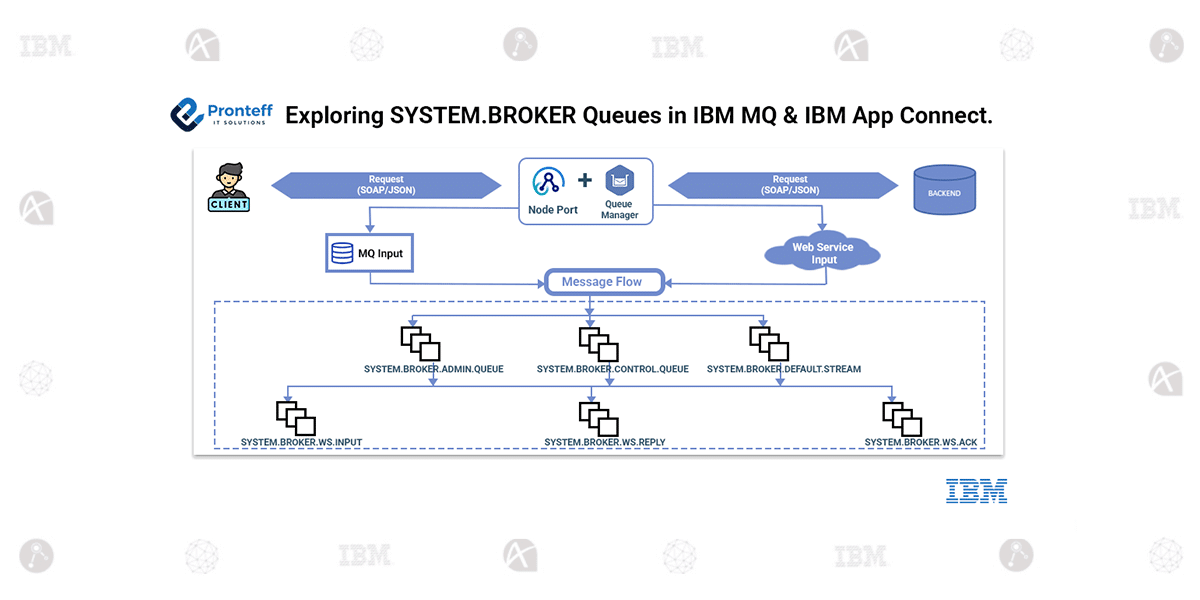
During this integration, administrators often notice several queues automatically created in the MQ queue manager with names beginning with “SYSTEM.BROKER.” and “SYSTEM.BROKER.WS.”. These queues are not intended for business application messaging. Instead, they form part of the internal infrastructure used by App Connect Enterprise to support administrative operations, broker control processing, internal runtime coordination, and web service messaging.
Understanding the role of these queues helps engineers design, operate, and troubleshoot MQ–ACE integration environments more effectively.
SYSTEM.BROKER.ADMIN.QUEUE
SYSTEM.BROKER.ADMIN.QUEUE is responsible for handling administrative operations directed to the integration node.
When management tasks occur—such as deploying integration applications, updating configurations, or managing integration servers—the administrative command is placed on this queue. The integration node retrieves the message and executes the corresponding operation.
Typical operations processed through this queue include:
- Deployment of BAR files
- Configuration updates
- Starting or stopping integration servers
- Administrative runtime operations
Queue activity can be monitored using:
DISPLAY QSTATUS(SYSTEM.BROKER.ADMIN.QUEUE)
During administrative actions, messages may briefly appear in this queue while commands are being processed.
SYSTEM.BROKER.CONTROL.QUEUE
SYSTEM.BROKER.CONTROL.QUEUE manages runtime control messages within the broker environment.
Operational commands—such as starting or stopping message flows—are transmitted through this queue. The integration node places control messages into this queue, and the integration server reads them to execute the requested operations.
A typical runtime control sequence follows this pattern:
Administrator issues control command
- Control message placed on SYSTEM.BROKER.CONTROL.QUEUE
- Integration server retrieves the control message
- Requested runtime operation is executed
Queue status can be monitored with:
DISPLAY QSTATUS(SYSTEM.BROKER.CONTROL.QUEUE) CURDEPTH
SYSTEM.BROKER.DEFAULT.STREAM
SYSTEM.BROKER.DEFAULT.STREAM represents the default internal execution stream used by the broker runtime.
In App Connect, message flows operate within execution contexts called streams. These streams coordinate how messages are processed internally by the broker.
The default stream acts as the primary execution environment for deployed message flows and ensures that runtime processing events are coordinated correctly within the integration node.
This stream is managed internally by the broker and supports message flow execution, routing logic, and internal runtime synchronization.
Web Service Transport Queues
When SOAP-based services are implemented using MQ transport, App Connect creates additional queues that support the web service request–response processing model.
These queues include:
SYSTEM.BROKER.WS.INPUT
SYSTEM.BROKER.WS.REPLY
SYSTEM.BROKER.WS.ACK
Together, these queues enable reliable web service messaging using MQ infrastructure.
SYSTEM.BROKER.WS.INPUT
SYSTEM.BROKER.WS.INPUT receives incoming web service requests.
When a client application sends a SOAP request, the message is placed into this queue. The request is then processed by the integration server through a Web Service Input node, which retrieves the message and passes it to the message flow for further processing.
The message flow performs the required integration logic, which may include invoking backend services or transforming the request message.
Queue status can be monitored using:
DISPLAY QSTATUS(SYSTEM.BROKER.WS.INPUT)
If the queue reaches its maximum capacity, incoming requests may fail with the MQ error:
MQRC_Q_FULL (2053)
SYSTEM.BROKER.WS.REPLY
SYSTEM.BROKER.WS.REPLY is responsible for preparing and storing response messages generated by the integration server.
After the backend system processes the request and returns a response, the message flow constructs the reply message and places it on this queue before returning it to the client.
Queue status can be verified with:
DISPLAY QSTATUS(SYSTEM.BROKER.WS.REPLY)
If this queue reaches its maximum depth, response messages cannot be returned until space becomes available.
SYSTEM.BROKER.WS.ACK
SYSTEM.BROKER.WS.ACK manages acknowledgment messages used for reliable message delivery.
Acknowledgment messages confirm that the response message has been successfully generated and delivered within the broker environment. This mechanism helps ensure reliable processing and prevents message loss during web service interactions.
Queue activity can be monitored using:
DISPLAY QSTATUS(SYSTEM.BROKER.WS.ACK)
Modifying Queue Parameters
Although these queues are part of the broker’s internal infrastructure, administrators may adjust certain performance-related parameters if required.
For example, increasing queue capacity can help accommodate higher message volumes during peak traffic conditions.
Example command:
ALTER QLOCAL(SYSTEM.BROKER.WS.INPUT) MAXDEPTH(10000)
Similarly, the maximum message size can be increased when larger payloads are expected:
ALTER QLOCAL(SYSTEM.BROKER.WS.INPUT) MAXMSGL(10485760)
After applying configuration changes, the updated settings can be verified using:
DISPLAY QUEUE(SYSTEM.BROKER.WS.INPUT) MAXDEPTH MAXMSGL
Only performance-related attributes should be modified. Structural changes to internal system queues should be avoided because they may interfere with normal broker operation.