
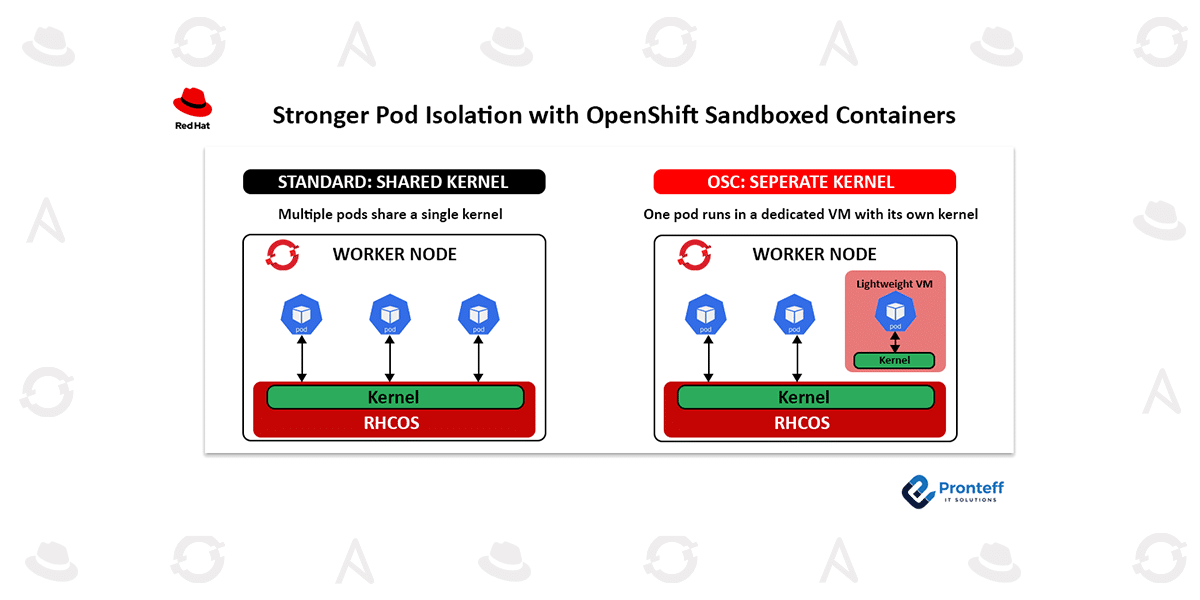
Stronger Pod Isolation with OpenShift Sandboxed Containers
In this blog, we will learn about stronger pod isolation with OpenShift sandboxed containers.
Containerized applications running on Red Hat OpenShift already benefit from multiple built-in security mechanisms. Security Context Constraints (SCCs) control the permissions available to pods, SELinux provides mandatory access control, cgroups regulate CPU and memory usage, and unnecessary Linux capabilities are restricted by default.
These protections provide strong security for most containerized applications. However, containers normally continue to operate on a common host kernel. This shared-kernel architecture may not provide the level of separation required for workloads that execute untrusted code or require elevated privileges.
For these scenarios, OpenShift Sandboxed Containers provide an additional isolation boundary by placing selected workloads inside lightweight virtual machines.
Understanding OpenShift Sandboxed Containers
OpenShift Sandboxed Containers are available with Microsoft Azure Red Hat OpenShift and provide VM-based isolation for container workloads. Instead of allowing a pod to directly share the node’s kernel with other workloads, the pod runs within a lightweight virtual machine that has its own kernel.
This approach combines the operational simplicity of containers with an additional virtualization boundary.
The existing OpenShift security architecture remains in place, while the virtual machine provides another layer of separation between the workload and the underlying host.
This article explains the concept behind OpenShift Sandboxed Containers, how the technology works on Microsoft Azure Red Hat OpenShift, and the situations where this additional isolation can be useful.
How Is a Sandboxed Container Different?
With conventional containers, multiple workloads can run on the same host while sharing the underlying Linux kernel. OpenShift applies several controls to prevent containers from accessing resources or performing actions outside their permitted scope.
However, the shared kernel remains part of the underlying architecture.
Sandboxed containers introduce another boundary. Each selected pod runs inside a lightweight VM, giving that workload its own kernel environment.
A simple way to visualize the difference is to compare a conventional apartment building with individual secured rooms. In a standard container environment, multiple occupants rely on the same underlying building infrastructure. With sandboxed containers, each selected workload receives an additional isolated space with its own operating-system kernel.
This additional boundary helps reduce the potential impact of a compromised workload.
OpenShift Sandboxed Containers are based on Kata Containers, an open-source technology designed to execute containers inside lightweight virtual machines. Instead of placing the container directly on the host kernel, Kata creates a VM environment for the workload.
As a result, if an application is compromised, the attacker encounters an additional virtualization boundary before reaching the host system or other workloads.
When Does Workload Sandboxing Make Sense?
OpenShift and Red Hat Enterprise Linux already provide extensive security capabilities. Therefore, running every application inside a separate VM is generally unnecessary.
Sandboxing becomes particularly relevant when a workload has a higher level of security exposure.
For example, organizations may need additional protection when applications:
- Execute code obtained from unknown or external sources
- Depend on libraries that have not been completely reviewed
- Process potentially malicious input
- Require privileged container capabilities
- Run workloads belonging to different tenants
- Execute dynamically generated code
- Handle applications where stronger isolation is required
AI-based applications introduce another potential use case. AI agents can dynamically generate commands or code and may interact with systems in ways that are difficult to predict in advance. Applications that execute generated or externally supplied code can therefore benefit from an additional isolation boundary.
Sandboxing can help limit the potential impact if such a workload is compromised.
Adding Another Security Layer to Azure Red Hat OpenShift
Microsoft Azure Red Hat OpenShift supports OpenShift Sandboxed Containers, allowing organizations to introduce VM-level workload isolation without having to design and maintain a separate virtualization infrastructure.
The OpenShift Sandboxed Containers Operator manages the deployment and configuration of the sandboxed runtime. It integrates with the OpenShift platform and configures the required runtime components through CRI-O.
The operator also establishes the appropriateRuntimeClass, allowing administrators to select sandboxed execution for workloads that require it.
Configuration is managed declaratively through a KataConfig custom resource.
An important point is that sandboxing does not replace OpenShift’s existing security mechanisms.
Instead, the technologies work together.
Existing controls such as:
- Security Context Constraints
- SELinux
- Linux capabilities
- cgroups
- OpenShift authorization controls
continue to protect workloads as they normally would.
The VM provides an additional boundary underneath those controls.
This layered approach allows organizations to strengthen workload isolation without abandoning their existing OpenShift security model or operational practices.
Additional Resource Isolation
Sandboxing can also strengthen the separation of workload resources.
Because a sandboxed workload operates inside its own VM, the resources available to that environment are constrained by the VM’s configuration. A container cannot simply bypass that boundary and consume arbitrary host resources.
Similarly, access to host devices is limited to resources that have explicitly been made available to the sandboxed environment.
This provides another layer of protection against workloads that behave unexpectedly or attempt to interact with resources outside their intended scope.
Should Every Pod Run in a Sandbox?
Not necessarily.
Although VM-based isolation provides additional security, it also introduces additional resource requirements. Creating and operating a lightweight VM for every pod can result in unnecessary overhead when the existing OpenShift security model already provides sufficient protection.
A more practical approach is to identify workloads that genuinely require stronger isolation and enable sandboxing selectively.
This makes the technology particularly useful for security-sensitive applications rather than treating VM isolation as a requirement for every workload in the cluster.
Getting Started with OpenShift Sandboxed Containers
Organizations using Microsoft Azure Red Hat OpenShift can enable sandboxed workloads through the OpenShift Sandboxed Containers Operator available through OperatorHub.
The general process involves:
- Install the OpenShift Sandboxed Containers Operator
Deploy the operator within the Azure Red Hat OpenShift cluster. - Configure the sandboxed runtime
Create and configure the appropriateKataConfigcustom resource. - Enable the runtime for selected workloads
Specify the appropriateRuntimeClassin the pod or workload configuration. - Deploy the workload
OpenShift provisions the required sandboxed environment and manages its lifecycle through the operator.
For example, workloads that need sandboxed execution can specify a runtimeClassName in their pod specification. This allows administrators to decide which applications should receive the additional VM-level isolation rather than applying it universally.
The operator handles the underlying configuration and lifecycle management, reducing the operational complexity associated with deploying the sandboxed runtime.
Why Workload Isolation Matters
Modern applications increasingly process code, data, and inputs that may originate outside the organization’s direct control. This is particularly relevant for multi-tenant platforms, privileged applications, software development environments, and AI-powered systems capable of executing dynamically generated instructions.
Traditional container security controls remain an important part of protecting these environments. However, workloads with elevated risk may require another layer of separation.
OpenShift Sandboxed Containers address this requirement by introducing a lightweight VM boundary while retaining the familiar OpenShift management model.
Conclusion
OpenShift already provides a comprehensive set of mechanisms for securing containerized workloads. For many applications, these controls provide the protection required for day-to-day operations.
However, workloads that execute untrusted code, require elevated privileges, support multiple tenants, or dynamically generate and execute code can present additional isolation requirements.
OpenShift Sandboxed Containers address these scenarios by running selected pods inside lightweight virtual machines based on Kata Containers. This gives workloads their own kernel while maintaining the existing OpenShift security controls and operational model.
For organizations running Microsoft Azure Red Hat OpenShift, this approach provides a practical way to introduce stronger workload isolation without having to build and operate a separate virtualization platform.
By applying sandboxing selectively to workloads that need it, organizations can add another layer of defense while maintaining the flexibility and management experience of OpenShift.